
Partial Derivatives: Dynamic Demonstration
Loading the math board and drawing, please wait…
In collections
MATH1052-edX
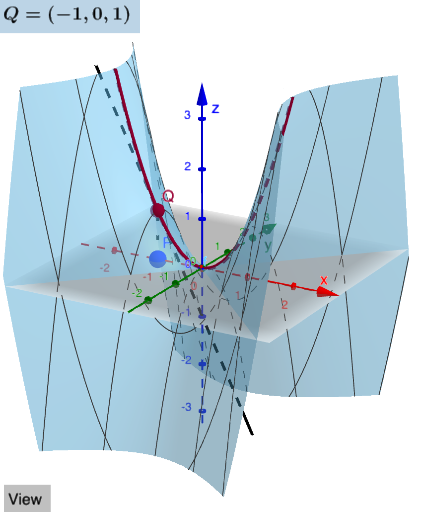
This example dynamically demonstrates the geometric meaning of partial derivatives using GeoGebra. Key mathematical concepts include derivatives, function graphs, and geometric transformations. Construction involves commands like Segment, Textfield, Derivative, CurveCartesian, and Point, along with Intersect and Vector to analyze derivative directions. Suitable for high school students or college undergraduates to understand the application of derivatives in geometry.
GeoGebra Commands & Parameters
Segment(A, B) → gTextfield(f) → InputBox1Derivative(f, x) → fxDerivative(f, y) → fyCurveCartesian(x(A), s, f(x(A), s), s, -10, 10) → cyCurveCartesian(s, y(A), f(s, y(A)), s, -10, 10) → cxCurveCartesian(x(A) + s, y(A), f(x(A), y(A)) + (s * fx(x(A), y(A))), s, -10, 10) → txCurveCartesian(x(A), y(A) + s, f(x(A), y(A)) + (s * fy(x(A), y(A))), s, -10, 10) → tyTextfield(Ax) → InputBox2Textfield(Ay) → InputBox3Function(f(x(A), y(A)) + (fx(x(A), y(A)) * (x - x(A))) + (fy(x(A), y(A)) * (y - y(A))), x(A) - 1, x(A) + 1, y(A) - 1, y(A) + 1) → TangPPoint(zAxis) → DIntersect(zAxis, yAxis) → EVector(D, E) → uPoint(xAxis) → FVector(F, E) → vPoint(yAxis) → GIntersect(yAxis, zAxis) → HVector(G, H) → wElement(list1, faces) → Selectedvector
AI Drawing Prompt Reference
Draw a 3D surface representing a function of two variables. Select a point on the surface. Through this point, draw two curves on the surface: one parallel to the x-direction and one parallel to the y-direction. At this point, draw two tangent lines to these curves, one in the x-direction and one in the y-direction, and show the corresponding partial derivative direction vectors. Also, mark three points on the coordinate axes and draw vectors from these points to the origin to indicate axis directions. Add a text input box for the function expression, and two numeric input boxes to adjust the point's coordinates. Finally, draw a tangent plane near the point on the surface and highlight the selected direction vector.
The prompt above was compiled from the original drawing commands and is for reference only.