
Parametric Straight Line: Parametric Equation in Coordinate Geometry
Loading the math board and drawing, please wait…
In collections
MATH1052-edX
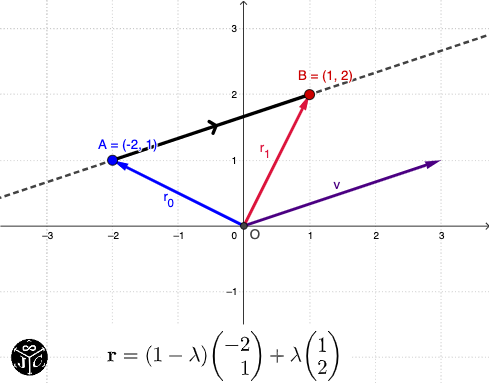
This example demonstrates how to represent a straight line using parametric equations and highlights its geometric significance. Key mathematical concepts include parametric equations, line equations, and coordinate geometry. Construction involves using GeoGebra commands like Intersect, Vector, and LaTeX. Suitable for high school students or college freshmen learning parametric equations in coordinate geometry.
GeoGebra Commands & Parameters
Intersect(xAxis, yAxis) → OVector(O, A) → r_0Vector(O, B) → r_1LaTeX(r_0, true, true) → text1LaTeX(r_1, true, true) → text2LaTeX(v, true, true) → text3Segment(A, B) → f
AI Drawing Prompt Reference
In a coordinate plane, start by taking the intersection of the axes as the origin. Specify two points A and B to define two direction positions relative to the origin, forming position vectors from the origin to A and to B. Add LaTeX-style text labels for these two vectors, and also display a label for the vector v associated with the line representation. Finally, draw the segment connecting A and B to visually indicate the straight-line relationship between the two endpoints, keeping the origin, endpoints, vectors, their labels, and the segment clearly visible.
The prompt above was compiled from the original drawing commands and is for reference only.