
Parametric Curve Design Example
Loading the math board and drawing, please wait…
In collections
Curves and Surfaces
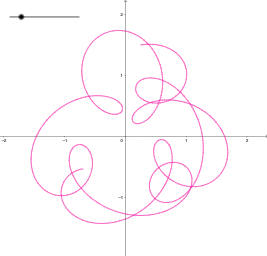
This example demonstrates how to create beautiful graphical designs using parametric equations. It involves core mathematical concepts like parametric equations, coordinate geometry, and curve design. The construction uses GeoGebra's Curve command and objects k, a to plot parametric curves. It is suitable for high school and above students to learn and understand the application of parametric equations, useful for mathematics education and geometric construction practice.
GeoGebra Commands & Parameters
CurveCartesian(sin(t) + (1 / 2 * sin((5 * t))) + (1 / 4 * cos((2.3 * t))), cos(t) + (1 / 2 * cos((5 * t))) + (1 / 4 * sin((2.3 * t))), t, 0, k) → a
AI Drawing Prompt Reference
Create a complex curve using parametric equations with sine and cosine functions, adjusting the parameter t from 0 to k to generate a curve composed of sin(t), cos(t), sin(5*t), and cos(5*t), with slight variations from cos(2.3*t) and sin(2.3*t) to enhance the complexity and aesthetics of the curve.
The prompt above was compiled from the original drawing commands and is for reference only.