
Parallelogram Theorem Demonstration by audrey.feldman
Loading the math board and drawing, please wait…
In collections
Parallelogram Lab
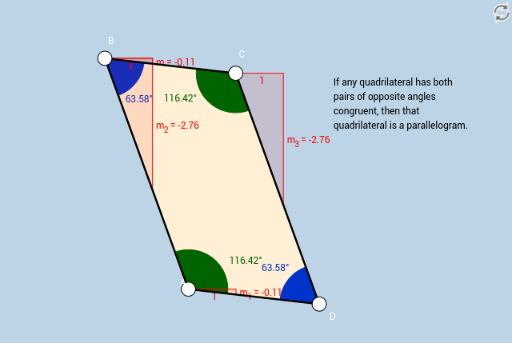
This example demonstrates the properties and construction of a parallelogram, dynamically verifying theorems such as equal opposite sides, equal opposite angles, and bisecting diagonals. Core math concepts include parallelograms, congruence, geometric construction, angle measurement, and distance calculation. Construction involves commands like Segment, Line, Intersect, Distance, Polygon, Angle, Slope to form the shape and compute attributes. Suitable for high school geometry education, emphasizing construction and theorem validation.
GeoGebra Commands & Parameters
Segment(B, C) → aSegment(C, D) → bLine(D, a) → cLine(B, b) → dIntersect(c, d) → ASegment(B, A) → eSegment(A, D) → fDistance(B, C) → distanceABDistance(C, D) → distanceBCDistance(D, A) → distanceCDDistance(A, B) → distanceDAPolygon(A, D, C, B) → poly1, d_1, c_1, b_1, a_1Angle(poly1) → α, β, γ, δSlope(a) → mSlope(f) → m_1Slope(e) → m_2Slope(b) → m_3
AI Drawing Prompt Reference
Draw a parallelogram to demonstrate its properties: equal opposite sides, equal opposite angles, and bisecting diagonals. Start by creating two parallel line segments, connect their endpoints to form the quadrilateral, then measure the lengths of opposite sides and the angles of the corners, and draw the diagonals to show they bisect each other.
The prompt above was compiled from the original drawing commands and is for reference only.