
Parallelogram Theorem Demonstration
Loading the math board and drawing, please wait…
In collections
Parallelogram Lab
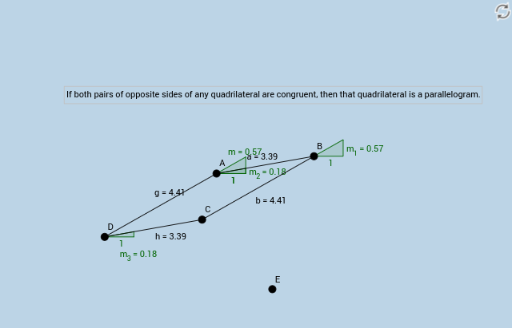
This example demonstrates the properties of a parallelogram and the relationship between vector addition and linear programming. It involves core mathematical concepts such as vectors, linear programming, and coordinate geometry. Construction highlights include using GeoGebra commands like Circle, Segment, Intersect, and Slope with objects A, B, c, a, C, d, b, e, f, D, E, g, h, m, m_1, m_2, m_3, text1. Suitable for high school mathematics education to understand the Parallelogram Theorem and vector applications.
GeoGebra Commands & Parameters
Circle(A, B) → cSegment(A, B) → aCircle(B, C) → dSegment(B, C) → bCircle(C, a) → eCircle(A, b) → fIntersect(e, f, 1) → DIntersect(e, f, 2) → ESegment(A, D) → gSegment(D, C) → hSlope(g) → mSlope(b) → m_1Slope(a) → m_2Slope(h) → m_3
AI Drawing Prompt Reference
Draw a parallelogram, showing that its diagonals bisect each other, and construct the intersection points of the diagonals using circles and segments. Label all sides and angles, then calculate and compare the slopes of opposite and adjacent sides to verify the properties of the parallelogram.
The prompt above was compiled from the original drawing commands and is for reference only.