
Parallelogram Rule - General Components
Loading the math board and drawing, please wait…
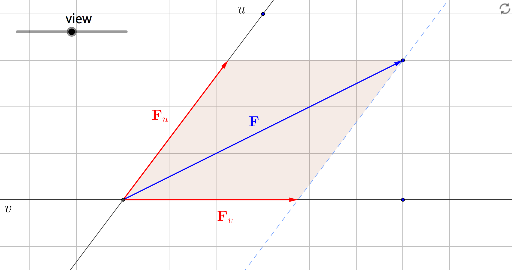
①This GeoGebra example dynamically demonstrates the parallelogram rule for vector addition, decomposing an arbitrary vector into general (non-orthogonal) components and visually showing how the two component vectors combine to form the resultant vector. ②Core mathematical concepts include vector addition, the parallelogram law, vector decomposition, and the geometric relationship between components and the resultant, with applications of cosine, tangent, and arithmetic mean in component calculations. ③Construction highlights: using commands such as Circle, Line, Vector, Intersect, and Polygon, the construction involves points A, B, C, D, E, F, vectors v, w and their decomposed parts v', w', polygons poly1 and poly2, and auxiliary lines a, d, f, g, h, i, j, k, l, with intersections and connecting segments to visualize the components and resultant. ④Suitable for high school and above for learning vector operations, geometric construction, and optimization problems, as well as for university-level linear algebra or physics instruction on vector composition.
GeoGebra Commands & Parameters
Circle(A, 2) → cLine(A, B) → f_2Line(C, A) → gLine(D, g) → hLine(D, f_2) → iVector(A, D) → fIntersect(f_2, h) → EVector(A, E) → vIntersect(g, i) → FVector(A, F) → wPolygon(D, E, A) → poly1, j, k, lVector(A + v, D) → w'Vector(A + w, D) → v'Polygon(D, F, A) → poly2, a, d, f_1Vector(B, A) → abVector(A, C) → ac