
Parallelogram Drag
Loading the math board and drawing, please wait…
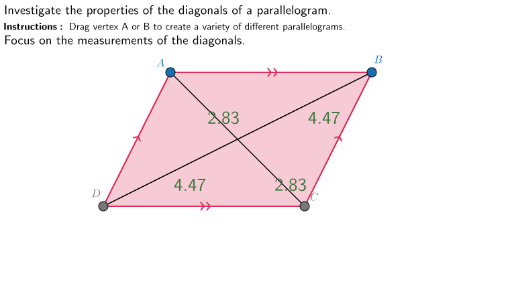
This example demonstrates the dragging effect of a parallelogram. Key mathematical concepts include the properties of a parallelogram, distance calculation, and midpoint. Using GeoGebra commands such as Join, Point, Mirror, and Polygon, a dynamic parallelogram can be constructed. Suitable for middle school and above students to learn geometric construction and related concepts.
GeoGebra Commands & Parameters
Join(Sequence[Sequence[(i, j), i, -6.5, 7.5, 0.1], j, -4, 2.5, 0.1]) → GridSpacePoint(GridSpace) → BPoint(GridSpace) → AMirror(A, O) → CMirror(B, O) → DPolygon(A, B, C, D) → Paralellogram, a, b, c, dSegment(A, C) → ACSegment(B, D) → BDMidpoint(A, O) → AOpointDistance(A, O) → AOlengthDistance(B, O) → BOlengthDistance(C, O) → COlengthDistance(D, O) → DOlengthMidpoint(B, O) → BOpointMidpoint(C, O) → COpointMidpoint(D, O) → DOpointSegment(A, B) → TopSegmentSegment(D, C) → BottomSegmentSegment(C, B) → RightSegmentSegment(D, A) → LeftSegment