
Parallelogram Construction by Murat (2)
Loading the math board and drawing, please wait…
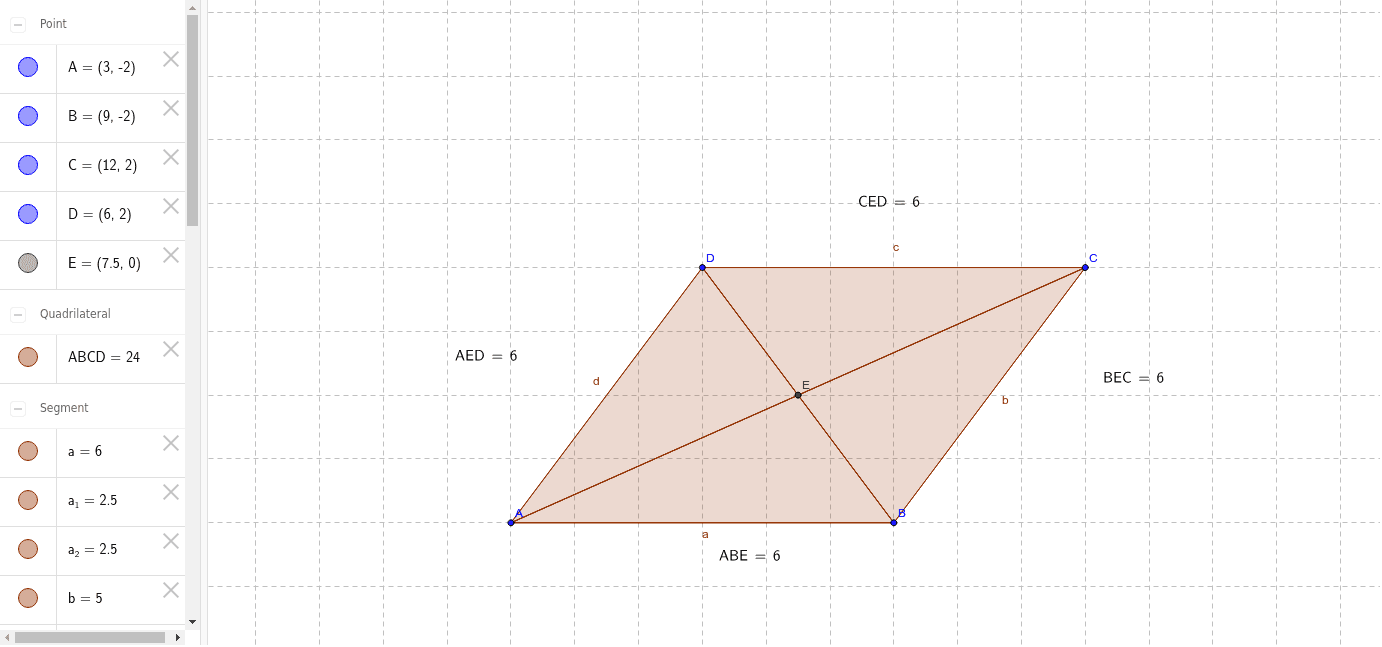
This example demonstrates the construction of a parallelogram and its properties. Key math concepts include vectors, two-dimensional space, symmetry, and reflection. Construction highlights involve using commands like Polygon, Segment, Intersect, and LaTeX to build vertices A, B, C, D, parallelogram ABCD, and vectors a, b, c, d. Suitable for high school mathematics education to understand geometric properties and vector applications.
GeoGebra Commands & Parameters
Polygon(A, B, C, D) → ABCD, a, b, c, dSegment(D, B) → eSegment(A, C) → fIntersect(e, f) → EPolygon(A, E, D) → AED, d_1, a_1, e_1Polygon(A, B, E) → ABE, e_2, a_2, b_1Polygon(B, C, E) → BEC, e_3, b_2, c_1Polygon(D, E, C) → CED, c_2, d_2, e_4LaTeX(AED, true, true) → text1LaTeX(ABE, true, true) → text2LaTeX(BEC, true, true) → text3LaTeX(CED, true, true) → text4
AI Drawing Prompt Reference
Draw a parallelogram ABCD with vertices A, B, C, and D. Connect the diagonals AC and BD to find their intersection point E. Then, draw triangles AED, ABE, BEC, and CED. Use LaTeX to label these triangles. Ensure the figure is clear to show the symmetry and vector relationships of the parallelogram.
The prompt above was compiled from the original drawing commands and is for reference only.