
Parallelogram 2: Polygon and Geometric Construction
Loading the math board and drawing, please wait…
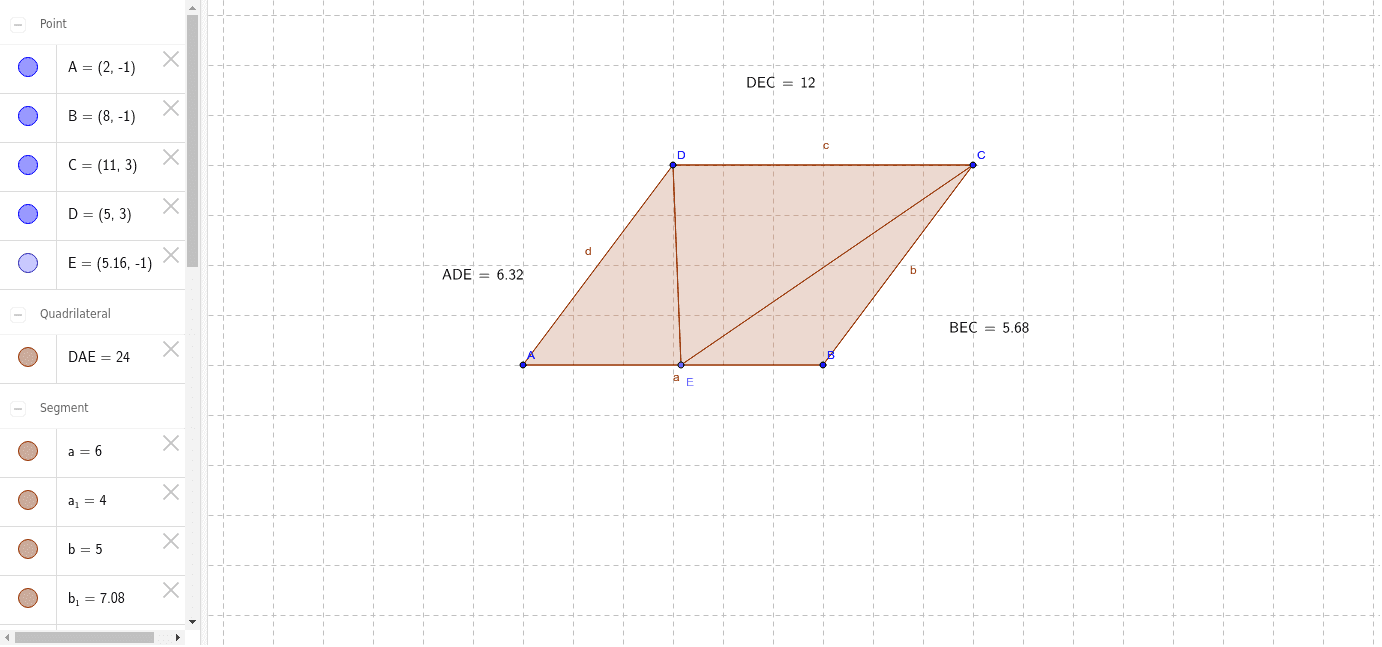
This example demonstrates the construction and properties of a parallelogram, involving polygon geometry, coordinate geometry, and geometric construction techniques. Key mathematical concepts include the definition of a parallelogram, coordinate calculation of vertices, and geometric transformations. Construction steps include using GeoGebra commands like Polygon, Point, and LaTeX to create points A, B, C, D, verifying parallel sides and equal lengths. Suitable for middle school students learning basic geometry or high school students reviewing analytic geometry.
GeoGebra Commands & Parameters
Polygon(A, B, C, D) → DAE, a, b, c, dPoint(a) → EPolygon(A, D, E) → ADE, e, a_1, d_1Polygon(E, C, B) → BEC, b_1, e_1, c_1LaTeX(ADE, true, true) → text1LaTeX(BEC, true, true) → text2LaTeX(BEC, true, true) → text3Polygon(D, E, C) → DEC, c_2, d_2, e_2LaTeX(DEC, true, true) → text4
AI Drawing Prompt Reference
Draw a parallelogram ABCD with points A, B, C, and D. Then draw triangles ADE and BEC. Finally, use LaTeX to label the sides of triangles ADE, BEC, and DEC.
The prompt above was compiled from the original drawing commands and is for reference only.