
Parallel Quadrilateral Animation
Loading the math board and drawing, please wait…
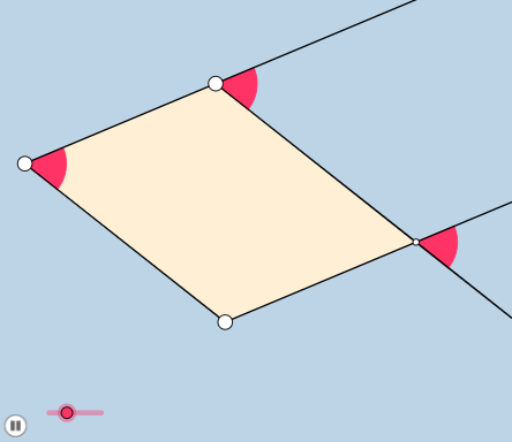
This example demonstrates the construction and properties of a parallelogram through animation, visually showing that its diagonals bisect each other. Core mathematical concepts include parallelogram, arithmetic operations, exponents, means, roots, and medians. The construction utilizes commands like Ray, Rotate, Line, Point, Intersect, Segment, Angle, Min, Circle, Dilate, CircleSector, Vector, Translate, Polygon, Midpoint, OrthogonalLine in GeoGebra. Suitable for high school mathematics education to help students understand the geometric and algebraic relationships of parallelograms.
GeoGebra Commands & Parameters
Ray(A, B) → fRotate(B, a°, A) → B'Ray(A, B') → gLine(B, g) → hPoint(g) → CLine(C, f) → iIntersect(h, i) → DSegment(C, D) → g_3Line(A, D) → t_1Segment(A, C) → f_3Angle(B, A, B') → αSegment(C, D) → jSegment(A, B) → kSegment(B, D) → lSegment(A, C) → mMin(m, k) → bCircle(C, (0.2 * b)) → dCircle(A, (0.2 * b)) → eCircle(B, (0.2 * b)) → pCircle(D, (0.2 * b)) → cIntersect(e, k, 1) → EIntersect(e, m, 1) → FIntersect(p, k, 1) → GIntersect(p, l, 1) → HIntersect(d, g, 2) → IRay(C, I) → qIntersect(c, h, 2) → JRay(D, J) → rIntersect(c, i, 2) → KRay(D, K) → sDilate(A, If[0 < o ≤ 1, 1 - o, 0], B) → A'Segment(A, A') → tRotate(E, If[1 < o ≤ 2, ((o - 1) * α), α], A) → E'CircleSector(A, E, E') → c_1Dilate(A, If[2 < o ≤ 3, 3 - o, 0], C) → A'_1Vector(A, A'_1) → uTranslate(c_1, u) → d_1Segment(A, A'_1) → f_1Dilate(C, If[3 < o ≤ 4, 4 - o, 0], D) → C'Vector(C, C') → vTranslate(d_1, v) → e_1Segment(C, C') → g_1Dilate(D, If[4 < o ≤ 5, 5 - o, 0], B) → D'Segment(D, D') → h_1Polygon(A, B, D, C) → poly1, a_1, b_1, d_2, c_2Dilate(A, If[5.5 < o ≤ 6.5, 6.5 - o, 0], C) → A'_2Vector(A, A'_2) → wTranslate(A, w) → A'_3Translate(A', w) → A''Dilate(A, If[6.5 < o ≤ 7.5, 7.5 - o, 0], B) → A'_4Vector(A, A'_4) → u_1Translate(A, u_1) → A'_5Translate(A'_1, u_1) → LRotate(D, If[6 < o ≤ 7, ((-(o - 6)) * π / 3), ((-π)) / 3], B) → D'_2Rotate(D', If[6 < o ≤ 7, ((-(o - 6)) * π / 3), ((-π)) / 3], B) → D''Rotate(C, If[6 < o ≤ 7, ((-(o - 6)) * π / 3), ((-π)) / 3], D) → C'_2Rotate(C', If[6 < o ≤ 7, ((-(o - 6)) * π / 3), ((-π)) / 3], D) → C''Rotate(A, If[6 < o ≤ 7, ((-(o - 6)) * π / 3), ((-π)) / 3], C) → A'_7Rotate(A'_1, If[6 < o ≤ 7, ((-(o - 6)) * π / 3), ((-π)) / 3], C) → MRotate(A, If[6 < o ≤ 7, ((-(o - 6)) * π / 3), ((-π)) / 3], A) → A'_8Rotate(A', If[6 < o ≤ 7, ((-(o - 6)) * π / 3), ((-π)) / 3], A) → A''_1Rotate(D, If[7 < o ≤ 8, ((o - 7) * π / 3), π / 3], D) → D'_3Rotate(D', If[7 < o ≤ 8, ((o - 7) * π / 3), π / 3], D) → D''_1Rotate(C, If[7 < o ≤ 8, ((o - 7) * π / 3), π / 3], C) → C'_3Rotate(C', If[7 < o ≤ 8, ((o - 7) * π / 3), π / 3], C) → C''_1Rotate(A, If[7 < o ≤ 8, ((o - 7) * π / 3), π / 3], A) → A'_9Rotate(A'_1, If[7 < o ≤ 8, ((o - 7) * π / 3), π / 3], A) → NRotate(A, If[7 < o ≤ 8, ((o - 7) * π / 3), π / 3], B) → A'_{10}Rotate(A', If[7 < o ≤ 8, ((o - 7) * π / 3), π / 3], B) → A''_2Line(A, D) → s_2Midpoint(A, D) → QRotate(A, If[16 < o ≤ 17, ((o - 16) * π), π], Q) → A'_{11}Midpoint(A, C) → ODilate(A, If[6 < o ≤ 7, 7 - o, 0], O) → A'_6Segment(A, A'_6) → i_1Rotate(A, If[7 < o ≤ 8, ((o - 7) * π), π], O) → A'_{12}Rotate(A'_6, If[7 < o ≤ 8, ((o - 7) * π), π], O) → PSegment(A'_{12}, P) → j_1Line(A, D) → k_1OrthogonalLine(B, k_1) → l_1Line(O, D) → m_1OrthogonalLine(B, m_1) → n_1Intersect(m_1, n_1) → RDilate(O, If[8 < o ≤ 9, 9 - o, 0], D) → O'Segment(O, O') → p_1Dilate(B, If[9 < o ≤ 10, 10 - o, 0], R) → B'_1Segment(B, B'_1) → q_1Angle(B, R, D) → βDilate(A, If[10 < o ≤ 11, 11 - o, 0], R) → A'_{13}Segment(A, A'_{13}) → r_1Angle(B, A, R) → γRotate(A, If[11.5 < o ≤ 12.5, ((-(o - 11.5)) * γ), (-γ)], A) → A'_{14}Rotate(A'_{13}, If[11.5 < o ≤ 12.5, ((-(o - 11.5)) * γ), (-γ)], A) → SSegment(A'_{14}, S) → s_1Line(O, D) → f_2Circle(D, 2) → e_2Circle(O, 2) → g_2Intersect(e_2, f_2, 2) → TIntersect(g_2, f_2, 1) → URay(D, T) → h_2Ray(O, U) → i_2Polygon(R, B, D, C, A) → poly2, r_2, b_2, d_3, c_3, a_2Polygon(R, B, A) → poly3, a_3, r_3, b_3
AI Drawing Prompt Reference
Draw a parallelogram to demonstrate how its diagonals bisect each other through animation. Start by drawing two parallel line segments, then from one endpoint of the first segment, draw a line parallel to the second segment. Connect the corresponding endpoints to form the parallelogram. Mark the intersection point of the diagonals and draw them. Finally, draw four small circles centered at the intersection point, and show the movement and trajectory of the diagonals as the animation progresses.
The prompt above was compiled from the original drawing commands and is for reference only.