
Parallel Lines and Angle Measures
Loading the math board and drawing, please wait…
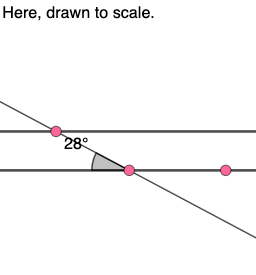
This example demonstrates the relationship between parallel lines and angles, involving key geometric concepts such as angles, straight lines, and triangles. Using GeoGebra commands like Line, Angle, Rotate, etc., it dynamically shows angle measurements and transformations. Suitable for middle school and above students to learn geometric construction and angle measurement.
GeoGebra Commands & Parameters
Line(A, B) → f_{1}Random(20, 160) → a_{1}Circle(A, 4) → c_{1}Intersect(c_{1}, f_{1}, 2) → CRotate(C, (a_{1} * π / 180), A) → C'Angle(C, A, C') → αIntersect(c_{1}, f_{1}, 1) → DAngle(C', A, D) → βMirror(C', A) → C''Ray(A, C'') → h_{1}Angle(D, A, C'') → γAngle(C'', A, C) → δLine(A, C') → g_{1}Point(g_{1}) → EVector(A, E) → uTranslate(f_{1}, u) → f'Translate(C, u) → C'_{1}Rotate(C'_{1}, (a_{1} * π / 180), E) → FRotate(F, π - (a_{1} * π / 180), E) → F'Rotate(F', (a_{1} * π / 180), E) → F''Angle(C'_{1}, E, F) → εAngle(F, E, F') → ζAngle(F', E, F'') → ηAngle(F'', E, C'_{1}) → θRandom(1, 8) → nTextfield(a) → InputBox1Segment(G, H) → iSegment(I, J) → jSegment(K, L) → kTextfield(b) → InputBox2Textfield(c) → InputBox3Textfield(d) → InputBox4Textfield(e) → InputBox5Textfield(f) → InputBox6Textfield(g) → InputBox7Textfield(h) → InputBox8
AI Drawing Prompt Reference
Draw two parallel lines and randomly select an angle on one line to rotate another point around a point. Measure and display the angle values. Then, draw a circle intersecting the parallel lines, mark the intersection points, rotate these points, and measure the new angles. Finally, generate new points and lines through translation and rotation, and measure the angles between these lines and points.
The prompt above was compiled from the original drawing commands and is for reference only.