
Parallel Lines and Angle Measures (2)
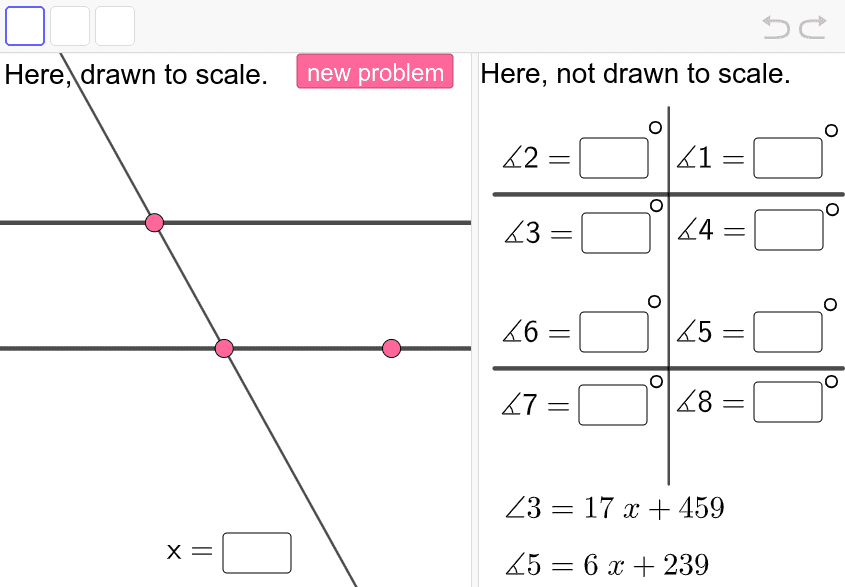
Loading the math board and drawing, please wait…
This example demonstrates the relationship between parallel lines and angles, involving core mathematical concepts such as angles, geometry, straight lines, triangles, difference and slope, geometric distribution, percentages, step functions, and median value. Construction highlights the use of GeoGebra commands and objects like Line, Random, Circle, Intersect, Rotate, Angle, Mirror, Ray, Point, Vector, Translate, Textfield, Segment, RandomElement, Simplify, Sequence, and Union. Suitable for high school students learning geometry and coordinate geometry.
GeoGebra Commands & Parameters
Line(A, B) → f_{1}Random(20, 160) → solCircle(A, 4) → c_{1}Intersect(c_{1}, f_{1}, 2) → CRotate(C, (sol * π / 180), A) → C'Angle(C, A, C') → αIntersect(c_{1}, f_{1}, 1) → DAngle(C', A, D) → βMirror(C', A) → C''Ray(A, C'') → h_{1}Angle(D, A, C'') → γAngle(C'', A, C) → δLine(A, C') → g_{1}Point(g_{1}) → EVector(A, E) → uTranslate(f_{1}, u) → f'Translate(C, u) → C'_{1}Rotate(C'_{1}, (sol * π / 180), E) → FRotate(F, π - (sol * π / 180), E) → F'Rotate(F', (sol * π / 180), E) → F''Angle(C'_{1}, E, F) → εAngle(F, E, F') → ζAngle(F', E, F'') → ηAngle(F'', E, C'_{1}) → θRandom(1, 8) → nTextfield(a) → InputBox1Segment(G, H) → iSegment(I, J) → jSegment(K, L) → kTextfield(b) → InputBox2Textfield(c) → InputBox3Textfield(d) → InputBox4Textfield(e) → InputBox5Textfield(f) → InputBox6Textfield(g) → InputBox7Textfield(h) → InputBox8Random(-20, 20) → coeff1RandomElement(Union[Sequence[i, i, -20, -1, 1], Sequence[i, i, 1, 20, 1]]) → s1Simplify((coeff1 * x) + l) → pSequence(i, i, -20, coeff1 - 1, 1) → l1, {-20, -19, -18, -17, -16, -15, -14, -13, -12, -11, -10, -9, -8, -7}Sequence(i, i, coeff1 + 1, 20, 1) → l2, {-5, -4, -3, -2, -1, 0, 1, 2, 3, 4, 5, 6, 7, 8, 9, 10, 11, 12, 13, 14, 15, 16, 17, 18, 19, 20}Union(l1, l2) → l3RandomElement(l3) → coeff2Simplify((coeff2 * x) + m) → qRandomElement(Union[Sequence[i, i, -20, -1, 1], Sequence[i, i, 1, 20, 1]]) → coeff3Simplify((coeff3 * x) + o) → rRandomElement(Union[Sequence[i, i, -20, -1, 1], Sequence[i, i, 1, 20, 1]]) → coeff4Simplify(180 - p(x)) → sRandomElement({1, 2, 3, 4}) → vRandomElement({5, 6, 7, 8}) → wRandomElement({0, 1}) → supptrueRandom(1, 2) → oddtrueRandom(20, 160) → sol_{1}Random(-20, 20) → coeff1_{1}RandomElement(Union[Sequence[i, i, -20, -1, 1], Sequence[i, i, 1, 20, 1]]) → s1_{1}Simplify((coeff1_{1} * x) + l_{1}) → p_{1}Simplify(180 - p_{1}(x)) → s_{1}Random(20, 160) → sol_{2}Random(-20, 20) → coeff1_{2}Textfield(ans) → InputBox9
AI Drawing Prompt Reference
Draw a coordinate-plane geometry figure. Start with two given points and construct a straight line through the first point. Construct a circle centered at the first point with a fixed radius, then find the two intersection points of the circle with the line. Rotate one intersection point about the first point by a specified angle to obtain a new point, and form a line through the first point and the rotated point. Choose a point on this new line, build a vector from the first point to that chosen point, and translate the original line and the circle’s key point(s) by this vector to get shifted counterparts. Then rotate the shifted objects about their corresponding centers multiple times by complementary angles, producing several additional points. Finally, at the first point mark several angles formed by rays to these constructed points, so the diagram highlights the relationships between the angle measures created by the parallel- or corresponding-line configuration.
The prompt above was compiled from the original drawing commands and is for reference only.