
Parallel and Perpendicular Lines in Dynamic Construction
Loading the math board and drawing, please wait…
In collections
COORDINATE GEOMETRY
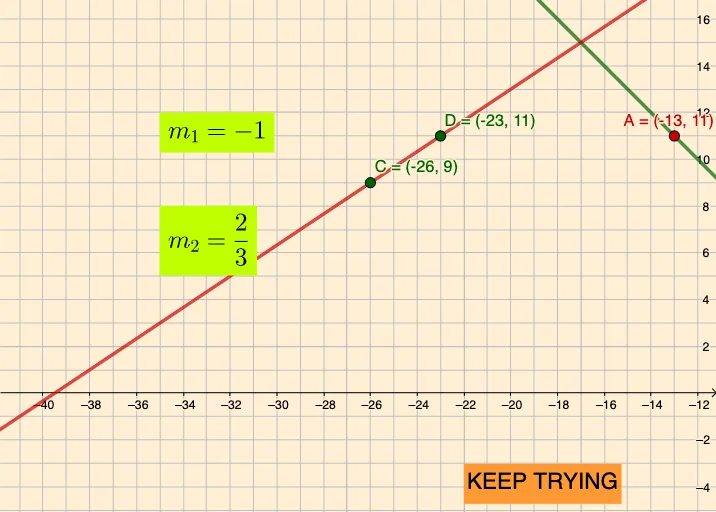
This example demonstrates how parallel and perpendicular constraints drive a connected geometric construction: key points and lines are determined in a coordinated way, with dynamic labels that help visualize the relationships. It centers on fundamental ideas such as parallel lines, perpendicular (normal) lines, representing line directions via slopes/parameters, and linking these constructions to circle-related objects (e.g., circumscribed/circumcircle components) and function-style elements (including quadratic-function connections). Construction-wise, the GeoGebra workflow relies on the commands “Line” and “perp”, with conditional logic via “If”. Objects A, B, C, D are used alongside line/parameter entities s₁, s₂ and m₁, m₂ to form and track the relevant lines; the use of infty supports direction handling for the perpendicular construction. Multiple text elements (text1–text4 and text5) and marker/annotation objects (parr) provide clear visual parameter feedback. Suitable for middle school through early university, especially for lessons on geometric construction, coordinate-geometry reasoning, and dynamic geometry visualization.
GeoGebra Commands & Parameters
Line(A, B) → fLine(D, C) → gIf(s_{1} ≟ infty ∨ s_{1} ≟ (-infty), "Undefined", FractionText[s_{1}]) → m_{1}If(s_{2} ≟ infty ∨ s_{2} ≟ (-infty), "Undefined", FractionText[s_{2}]) → m_{2}
AI Drawing Prompt Reference
Draw a straight line and a parallel line, along with a perpendicular line to the first line. Ensure these lines are correctly connected in the geometric figure and use labels to mark them. Keep the figure clear to understand the relationships of parallel and perpendicular lines.
The prompt above was compiled from the original drawing commands and is for reference only.