
Paraboloid Views: Exploring Surfaces and Intersections
Loading the math board and drawing, please wait…
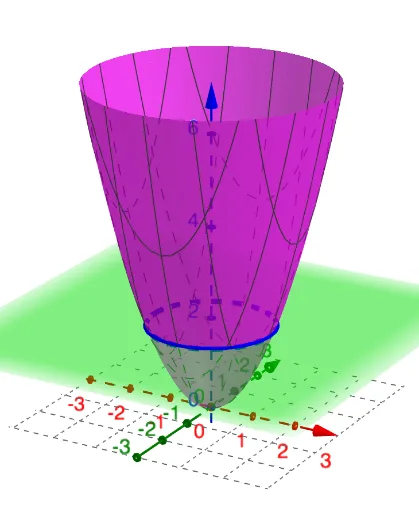
This GeoGebra example dynamically visualizes a paraboloid from multiple viewpoints, using the IntersectPath command to compute intersection curves between the surface and objects such as planes, cylinders, or other surfaces. It demonstrates how cross-sections of a paraboloid yield conic sections like parabolas and ellipses, reinforcing concepts in solid geometry, coordinate geometry, and quadratic surfaces. The construction involves objects labeled a, n, p, and eq1, where a likely represents the paraboloid equation, n a cutting plane or cylinder, p a parameter point, and eq1 an auxiliary equation; the IntersectPath command generates the visible intersection paths. This example is suitable for high school or undergraduate students studying analytic geometry, multivariable calculus, or 3D visualization, helping to build spatial reasoning and understanding of surface-section relationships.
GeoGebra Commands & Parameters
IntersectPath(p, a) → eq1
AI Drawing Prompt Reference
Visualize a rotating paraboloid intersecting with a cutting plane or cylinder to display conic sections like parabolas or ellipses, emphasizing the relationship between cross-sections and quadratic surfaces by adjusting a parameter point dynamically, suitable for students studying solid geometry, coordinate geometry, and 3D visualization.
The prompt above was compiled from the original drawing commands and is for reference only.