
Parabola Rotated Around x-Axis by Steve Phelps
Loading the math board and drawing, please wait…
In collections
BC Calculus
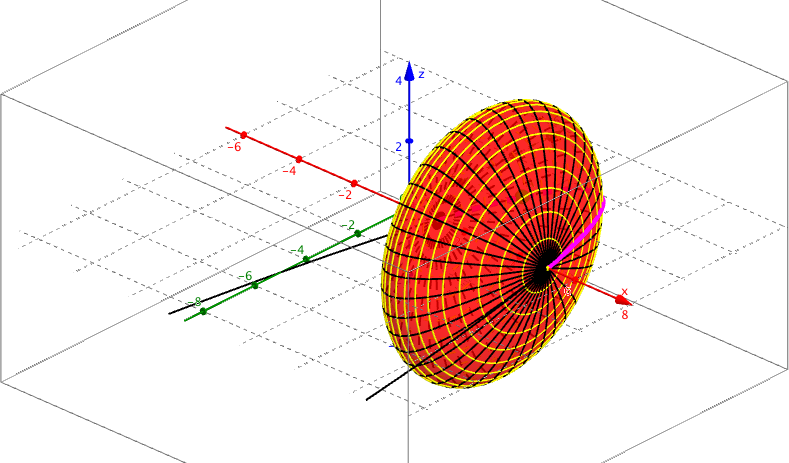
This example demonstrates the solid formed by rotating the part of the graph of f(x)=-(x-1)(x-5) above the x-axis around the x-axis. Key math concepts include solids of revolution, definite integral, parabola, and solid geometry. It uses GeoGebra commands like CurveCartesian for graphing, Point for creating points, Surface for generating the rotated surface, and Sequence for creating sequences. Suitable for high school and above students learning about solids and integral applications.
GeoGebra Commands & Parameters
CurveCartesian(t, f(t), t, 1, 5) → aPoint(a) → ASurface(u, (f(u) * cos(v)), (f(u) * sin(v)), u, 1, 5, v, 0, 6.283185307179586) → bSequence(CurveCartesian[t, (f(t) * cos(a)), (f(t) * sin(a)), t, 1, 5], a, 0, 6.283185307179586, 0.15707963267948966) → list1Sequence(Circle[xAxis, (t, f(t), 0)], t, 1, 5, 0.2) →Sequence(Circle[xAxis, (t, f(t), 0)], t, 1, 5, 0.2) →Sequence(Circle[xAxis, (a, f(a), 0)], a, 1, 5, 0.2) →Sequence(Circle[(a, f(a), 0), (a, (-f(a)), 0), (a, 0, f(a))], a, 1, 5, 0.2) → list2
AI Drawing Prompt Reference
Draw the parabola y=-(x-1)(x-5) above the x-axis, then rotate it around the x-axis to form a solid shape. First, plot the parabola, then create a point A on the parabola and rotate it around the x-axis to generate the solid surface. Finally, use rotation and translation to create a series of circles around the x-axis, forming the outline of the solid.
The prompt above was compiled from the original drawing commands and is for reference only.