
Pappus Area Theorem Dynamic Demonstration
Loading the math board and drawing, please wait…
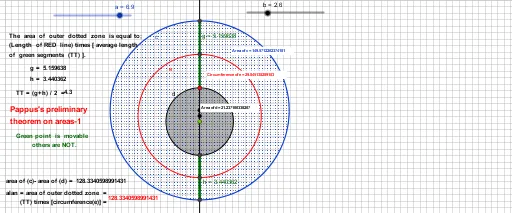
This GeoGebra example demonstrates the Pappus area theorem through an interactive geometric construction. It visualizes how areas of certain regions relate to each other, involving circles, triangles, centroids (barycenters), circumcircles, symmetry transformations, and area calculations. The construction uses commands such as Circle, Line, Point, Intersect, Midpoint, Segment, Circumference, PointIn, and Area to create multiple circles, lines, intersection points, midpoints, segments, and interior points. Dynamic text objects display computed area values, allowing users to explore the theorem's area relationships. Suitable for high school or college geometry courses, this example helps students understand the Pappus area theorem, centroid properties, and the connection between geometric construction and area measurement.
GeoGebra Commands & Parameters
Circle(A, a) → cLine(A, B) → fPoint(f) → CCircle(C, b) → dPoint(d) → DIntersect(c, f, 2) → EMidpoint(D, E) → FIntersect(d, f, 1) → GIntersect(c, f, 1) → HMidpoint(G, H) → IMidpoint(F, I) → JCircle(J, F) → eSegment(D, E) → gSegment(G, H) → hCircumference(e) → circumferenceePointIn(e) → PointePointIn(d) → Pointd_{1}Area(d) → iPointIn(d) → PointdArea(c) → jPointIn(c) → Pointc
AI Drawing Prompt Reference
Draw a horizontal line with two points on it as centers of two circles of different radii, both intersecting the line. Mark intersection points on the line between and outside the circles, and connect them to form segments. Take midpoints of these segments, then the midpoint of those midpoints as a new center, and draw a third circle with radius equal to the distance from this center to one of the intersection points. Place an interior point inside each of the three circles, and display the computed areas of the circles as text to illustrate the area relationship.
The prompt above was compiled from the original drawing commands and is for reference only.