
Paper Windmill
Loading the math board and drawing, please wait…
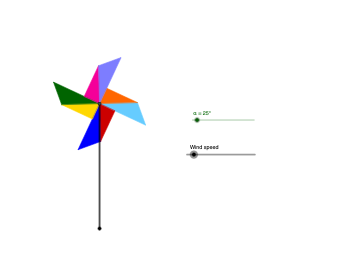
This example demonstrates the geometric construction of a paper windmill. It involves concepts such as rotation and polygons. Using GeoGebra commands like Rotate, Polygon, and Point, a dynamic paper windmill model can be constructed. Suitable for middle school and above students to learn about geometric transformations and properties of polygons.
GeoGebra Commands & Parameters
Intersect(xAxis, yAxis) → APoint(yAxis) → BPoint(yAxis) → CPoint(xAxis) → EPolygon(A, D, C) → t1, c, a, dPolygon(D, E, A) → t2, a_1, d_1, eRotate(D, (-α), A) → D'Rotate(E, (-α), A) → E'Rotate(A, (-α), A) → A'Polygon(D', E', A') → t2', a', d', e'Rotate(A, (-α), A) → A'_{1}Rotate(D, (-α), A) → D'_{1}Rotate(C, (-α), A) → C'Polygon(A'_{1}, D'_{1}, C') → t1', c', a'_{1}, d'_{1}Rotate(D', -90°, A) → D''Rotate(E', -90°, A) → E''Rotate(A', -90°, A) → A''Polygon(D'', E'', A'') → t2'', a'', d'', e''Rotate(A'_{1}, -90°, A) → FRotate(D'_{1}, -90°, A) → GRotate(C', -90°, A) → C''Polygon(F, G, C'') → t1'', c'', f, gRotate(F, -90°, A) → F'Rotate(G, -90°, A) → G'Rotate(C'', -90°, A) → C'''Polygon(F', G', C''') → t1''', c''', f', g'Rotate(D'', -90°, A) → D'''Rotate(E'', -90°, A) → E'''Rotate(A'', -90°, A) → A'''Polygon(D''', E''', A''') → t2''', a''', d''', e'''Rotate(F', -90°, A) → F''Rotate(G', -90°, A) → G''Rotate(C''', -90°, A) → HPolygon(F'', G'', H) → t3, h, f'', g''Rotate(D''', -90°, A) → IRotate(E''', -90°, A) → JRotate(A''', -90°, A) → KPolygon(I, J, K) → t4, k, i, jSegment(A, B) → l
AI Drawing Prompt Reference
Draw a paper windmill model. Start by defining four points A, B, C, and E on the axes, then construct two triangles t1 and t2 using these points. Next, rotate t1 and t2 around point A by -α each time to generate new triangles t1', t2', and so on. Finally, continue rotating these triangles by -90° each time to create more triangles t1'', t2'', and so on, until the complete paper windmill model is formed.
The prompt above was compiled from the original drawing commands and is for reference only.