
Painting Circles
Loading the math board and drawing, please wait…
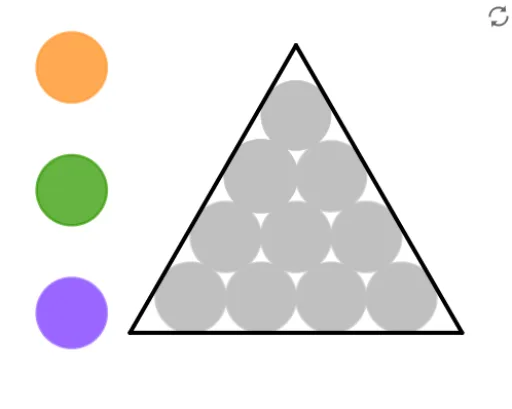
This example demonstrates how to draw circles and related geometric elements using GeoGebra. It involves core mathematical concepts such as circles, coordinate geometry, geometric transformations, and matrix operations. Key GeoGebra commands/objects used include Polygon, Midpoint, Circle, Intersect, Line, Rotate, and Tangent. Suitable for high school mathematics teaching, explaining properties of circles, geometric transformations, and applications of coordinate geometry.
GeoGebra Commands & Parameters
Polygon(C_{c7}, C_{c10}, 3) → poly1, f, g, h, C_{c1}Midpoint(h) → DMidpoint(g) → EMidpoint(f) → FCircle(C_{c7}, 1) → c_7grayCircle(C_{c1}, 1) → c_1orangeCircle(C_{c10}, 1) → c_{10}grayIntersect(c_1orange, h, 1) → GIntersect(c_1orange, g, 1) → HIntersect(c_{10}gray, g, 1) → IIntersect(c_7gray, f, 1) → JIntersect(c_7gray, h, 1) → KIntersect(c_{10}gray, f, 1) → LMidpoint(J, F) → C_{c8}Circle(C_{c8}, 1) → c_8grayMidpoint(F, L) → C_{c9}Midpoint(I, E) → C_{c6}Midpoint(E, H) → C_{c3}Midpoint(G, D) → C_{c2}Midpoint(D, K) → C_{c4}Circle(C_{c2}, 1) → c_2orangeCircle(C_{c4}, 1) → c_4grayCircle(C_{c3}, 1) → c_3grayCircle(C_{c6}, 1) → c_6grayCircle(C_{c9}, 1) → c_9grayMidpoint(C_{c4}, C_{c6}) → C_{c5}Circle(C_{c5}, 1) → c_5grayLine(A, B) → iRotate(B, 120°, C_{c10}) → B'Rotate(A, (-(120°)), C_{c7}) → A'Tangent(A', c_7gray) → j,Tangent(B', c_{10}gray) → k,Intersect(j, k) → CIntersect(i, j) → MIntersect(i, k) → NPolygon(M, N, C) → t1, c_{11}, m, nCircle(C_{laranja}, 1) → dCircle(C_{verde}, 1) → eCircle(C_{roxo}, 1) → pCircle(C_{c2}, 1) → c_2purpleCircle(C_{c2}, 1) → c_2greenCircle(C_{c2}, 1) → c_2grayCircle(C_{c1}, 1) → c_1grayCircle(C_{c1}, 1) → c_1purpleCircle(C_{c1}, 1) → c_1greenCircle(C_{c3}, 1) → c_3orangeCircle(C_{c3}, 1) → c_3greenCircle(C_{c3}, 1) → c_3purpleCircle(C_{c4}, 1) → c_4orangeCircle(C_{c4}, 1) → c_4greenCircle(C_{c4}, 1) → c_4purpleCircle(C_{c5}, 1) → c_5orangeCircle(C_{c5}, 1) → c_5greenCircle(C_{c5}, 1) → c_5purpleCircle(C_{c6}, 1) → c_6greenCircle(C_{c6}, 1) → c_6purpleCircle(C_{c6}, 1) → c_6orangeCircle(C_{c7}, 1) → c_7orangeCircle(C_{c7}, 1) → c_7greenCircle(C_{c7}, 1) → c_7purpleCircle(C_{c8}, 1) → c_8greenCircle(C_{c8}, 1) → c_8orangeCircle(C_{c8}, 1) → c_8purpleCircle(C_{c9}, 1) → c_9greenCircle(C_{c9}, 1) → c_9purpleCircle(C_{c9}, 1) → c_9orangeCircle(C_{c10}, 1) → c_{10}greenCircle(C_{c10}, 1) → c_{10}purpleCircle(C_{c10}, 1) → c_{10}orange
AI Drawing Prompt Reference
Draw a figure consisting of three triangles, each vertex on a different colored circle. The centers of these circles are the centroids of the triangles. Small circles are drawn at the midpoints of each triangle, and lines connect these midpoints. Tangents are drawn from the points where the lines intersect the circles, and the intersection points of these tangents are connected to form another polygon.
The prompt above was compiled from the original drawing commands and is for reference only.