
Outdoor Fountain Mathematical Construction: Intersection of Circles and Quadrati
Loading the math board and drawing, please wait…
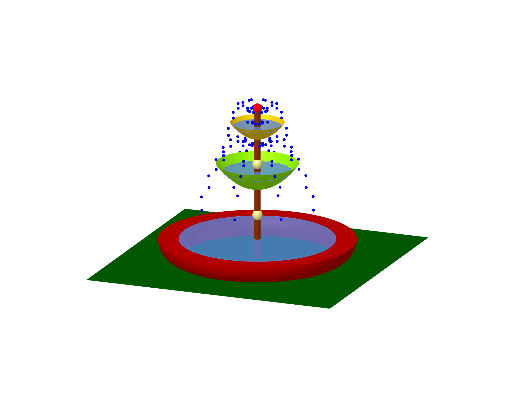
This example demonstrates the geometric construction of an outdoor fountain, involving concepts such as circles, quadratic functions, and intersection points. The construction uses GeoGebra commands like Rotate, Surface, Intersect, etc. It is suitable for high school students or math enthusiasts learning geometry and function applications.
GeoGebra Commands & Parameters
Rotate(f, 90°, xAxis) → f_{1}Rotate(g, 90°, xAxis) → g_{1}Surface(f_{1}, 360°, zAxis) → aSurface(g_{1}, 360°, zAxis) → bIntersect(g, yAxis, (0, 2)) → AIntersect(f, xAxis, (0, 0)) → BSegment(F, B) → kRotate(E, 90°, xAxis) → E'Rotate(F, 90°, xAxis) → F'Segment(E', F') → j'Rotate(D, 90°, xAxis) → D'Rotate(G, 90°, xAxis) → G'Rotate(E, 90°, xAxis) → E'_{1}CircumcircleArc(D', G', E'_{1}) → c'Rotate(C, 90°, xAxis) → C'Rotate(D, 90°, xAxis) → D'_{1}Segment(C', D'_{1}) → i'CircumcircleArc(D'_{1}, G', E'_{1}) → dSurface(d, 360°, zAxis) → lPoint(zAxis) → HCircle(H, 3, zAxis) → pCylinder(p, -0.8000000000000036) → r, s, t_{1}Line(H, xAxis) → nIntersect(n, p, 2) → ILine(I, zAxis) → qIntersect(q, s, 1) → JSphere(I, J) → oIntersect(q, o, 2) → KIntersect(n, o, 1) → LSegment(I, L) → h_1Surface(h_1, 360°, zAxis) → uCircleArc(I, L, J) → c_1Surface(c_1, 360°, zAxis) → vPoint(zAxis) → MCircle(N, 0.91, zAxis) → e_1Rotate(h, 90°, xAxis) → h_{2}Circle(M, 1.32, zAxis) → d_1Rotate(t, 90°, xAxis) → wPoint(zAxis) → OPoint(zAxis) → PPoint(w) → QRotate(R, 90°, xAxis) → R'Rotate(S, 90°, xAxis) → S'Rotate(T, 90°, xAxis) → T'Rotate(U, 90°, xAxis) → U'Rotate(V, 90°, xAxis) → V'Rotate(W, 90°, xAxis) → W'Rotate(W, 90°, xAxis) → W'_{1}Rotate(Z, 90°, xAxis) → Z'Rotate(l1, 45°, zAxis) → l1'Rotate(l1, 90°, zAxis) → l1'_{1}Rotate(l1, 135°, zAxis) → l1'_{2}Rotate(l1, 180°, zAxis) → l1'_{3}Rotate(l1, 225°, zAxis) → l1'_{4}Rotate(l1, 270°, zAxis) → l1'_{5}Rotate(l1, 315°, zAxis) → l1'_{6}Rotate(l1, 360°, zAxis) → l1'_{7}Rotate(J_1, 90°, xAxis) → L_1Rotate(I_1, 90°, xAxis) → M_1Rotate(H_1, 90°, xAxis) → N_1Rotate(G_1, 90°, xAxis) → O_1Rotate(F_1, 90°, xAxis) → P_1Rotate(E_1, 90°, xAxis) → Q_1Rotate(K_1, 90°, xAxis) → R_1Rotate(D_1, 90°, xAxis) → S_1Rotate(C_1, 90°, xAxis) → T_1Rotate(B_1, 90°, xAxis) → U_1Rotate(l2, 45°, zAxis) → l2'Rotate(l2, 90°, zAxis) → l2'_{1}Rotate(l2, 135°, zAxis) → l2'_{2}Rotate(l2, 180°, zAxis) → l2'_{3}Rotate(l2, 225°, zAxis) → l2'_{4}Rotate(l2, 270°, zAxis) → l2'_{5}Rotate(l2, 315°, zAxis) → l2'_{6}Rotate(l2, 360°, zAxis) → l2'_{7}Intersect(yAxis, zAxis) → V_1Point(zAxis) → W_1Vector(V_1, W_1) → u_1Translate(l, u_1) → l'Point(zAxis) → Z_1Point(zAxis) → A_2Polygon(D_2, E_2, B_2, C_2) → q1, d_2, e_2, b_2, c_2Point(zAxis) → F_2Point(zAxis) → G_2Cylinder(G_2, A_2, 0.12) → c, e, k_1, i
AI Drawing Prompt Reference
Draw a geometric construction of an outdoor fountain involving circles and quadratic functions. Start by creating surfaces from two rotated function graphs. Identify intersection points with axes, and connect them with line segments. Construct geometric shapes using rotations and circular arcs. Add cylindrical and spherical elements to complete the fountain design.
The prompt above was compiled from the original drawing commands and is for reference only.