
Orthoptic (i.e. directrix) of a parabola - using LocusEquation
Loading the math board and drawing, please wait…
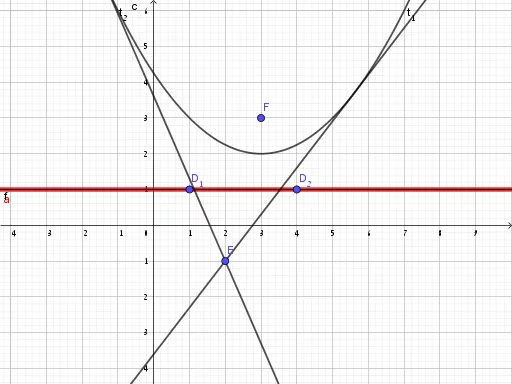
This example demonstrates the orthoptic (i.e. directrix) of a parabola using LocusEquation. It involves core math concepts like parabola, locus equation, derivatives, and coordinate geometry. Construction highlights include using GeoGebra commands Line, Parabola, Tangent, LocusEquation with objects such as focus F, directrix points D_1, D_2, function f, constant c, point E, tangent parameters t_1, t_2, and parameter a. Suitable for high school and above students learning parabola properties and locus equation applications.
GeoGebra Commands & Parameters
Line(D_1, D_2) → fParabola(F, f) → cTangent(E, c) → t_1, t_2LocusEquation(t_1 ⊥ t_2, E) → a
AI Drawing Prompt Reference
Draw a parabola and its orthoptic locus, showing the relationship between the focus and the directrix. Start by drawing a line as the directrix, then sketch the parabola using the focus and directrix. Next, find the tangent lines from an arbitrary point on the parabola and determine their intersection point locus, which represents the orthoptic locus of the parabola. Highlight the geometric connection between the tangent lines and the orthoptic locus, suitable for students studying parabola properties and locus equations.
The prompt above was compiled from the original drawing commands and is for reference only.