
Orthocenter, Inradius, and Circumradius of a Triangle
Loading the math board and drawing, please wait…
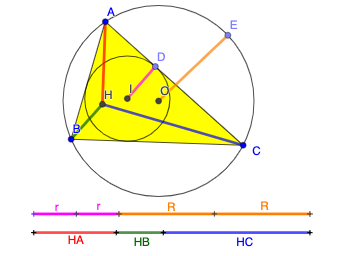
This example demonstrates the orthocenter, inradius, and circumradius of a triangle. Key mathematical concepts include the orthocenter, incircle, and circumcircle of a triangle. Using GeoGebra commands such as Polygon, Incircle, and OrthogonalLine, the orthocenter, inradius, and circumradius of a triangle can be constructed. Suitable for high school mathematics education and learning.
GeoGebra Commands & Parameters
Polygon(A, B, C) → t1, c, a, bCircle(A, B, C) → dIncircle(A, B, C) → eOrthogonalLine(A, a) → fOrthogonalLine(C, c) → gIntersect(f, g) → HSegment(A, H) → hSegment(H, B) → iSegment(H, C) → jCenter(e) → ICenter(d) → OPoint(e) → DSegment(I, D) → kPoint(d) → ESegment(O, E) → lLine(F, G) → mCircle(F, h) → pIntersect(p, m, 2) → JCircle(J, i) → qIntersect(q, m, 2) → KCircle(K, j) → rIntersect(r, m, 2) → LSegment(F, J) → sSegment(J, K) → tSegment(K, L) → f_1Line(M, N) → g_1Circle(M, k) → c_1Intersect(c_1, g_1, 2) → PCircle(P, k) → d_1Intersect(d_1, g_1, 2) → QCircle(Q, l) → e_1Intersect(e_1, g_1, 2) → RCircle(R, l) → h_1Segment(M, P) → i_1Segment(P, Q) → j_1Segment(Q, R) → k_1Intersect(h_1, g_1, 2) → SSegment(R, S) → l_1
AI Drawing Prompt Reference
Draw a triangle and label its orthocenter, incircle, and circumcircle. Start by drawing the triangle, then its circumcircle and incircle. Next, find the three altitudes of the triangle and mark their intersection as the orthocenter. Draw a line segment from the orthocenter to the incenter to represent the inradius, and another from the circumcenter to a point on the circumcircle for the circumradius. Finally, draw a circle centered at the orthocenter with the inradius as the radius, and intersect this circle with the altitudes to create smaller circles tangent to the altitudes.
The prompt above was compiled from the original drawing commands and is for reference only.