
Opposite Integers Interactive Practice: Number Line and Grid Pairing
Loading the math board and drawing, please wait…
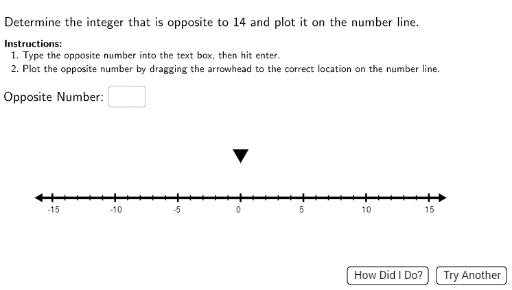
① This interactive example for middle school students demonstrates how to identify and pair opposite integers (e.g., 3 and -3) on a number line and grid, using drag-and-drop and typed answers to reinforce the concept. ② Core math concepts include the definition of opposite integers, symmetric positions on the number line, correspondence between positive and negative numbers, and visual representation of integers in a grid. ③ Construction uses GeoGebra commands such as Segment, Sequence, Join, Point, Random, Textfield, and InputBox1 to build the number line and grid, with CreateCheckMark, RightCheck, and WrongCheck for instant feedback, and DragArea/DragRad objects for interactive dragging, while LaTeX displays mathematical expressions. ④ Suitable for grades 7-8 learning rational numbers, as a classroom exercise or homework tool to grasp the intuitive meaning of opposites.
GeoGebra Commands & Parameters
Segment(StartPoint, EndPoint) → MainSegmentSequence(Segment[(i / 10, 2.2), (i / 10, 7)], i, -150, 150, 1) → CustomGridSegmentsSequence((i, 0.5), i, -15, 15, 1) → CustomGridPointsJoin({CustomGridPoints, CustomGridSegments}) → CustomFullGridPoint(CustomFullGrid) → Point1LaTeX(Text["\checkmark"]) → RightCheckLaTeX(Text["×"]) → WrongCheckTextfield(inputans) → InputBox1Sequence((i, 0), i, x(StartPoint) + 1, x(EndPoint) - 1, 5) → TickMarksSequenceSequence((i, 0), i, x(StartPoint) + 1, x(EndPoint) - 1, 1) → SmallTicksSequence(Text[i, (i - 0.35, -1.2)], i, -15, 15, 5) → DisplayTickMarksSequenceLaTeX(Text[inputans]) → ArrowLabelLaTeX(Text["Opposite\ Number \text{:}"]) → OppositeNumberRandom(-15, 15) → Int1
AI Drawing Prompt Reference
Draw a horizontal number line from negative fifteen to positive fifteen, with tick marks every five units and numbers labeled below each major tick. Above the number line, construct a grid of thin vertical lines spanning the same horizontal range, from y equals 2.2 to y equals 7, with small dots at grid intersections. Place a draggable point randomly on the grid. Provide an input box for the user to type the opposite integer of the number indicated by the point. Show a checkmark when the answer is correct and a cross when wrong. Display the label 'Opposite Number:' and the typed value above the grid.
The prompt above was compiled from the original drawing commands and is for reference only.