
Opposite Angles of a Parallelogram
Loading the math board and drawing, please wait…
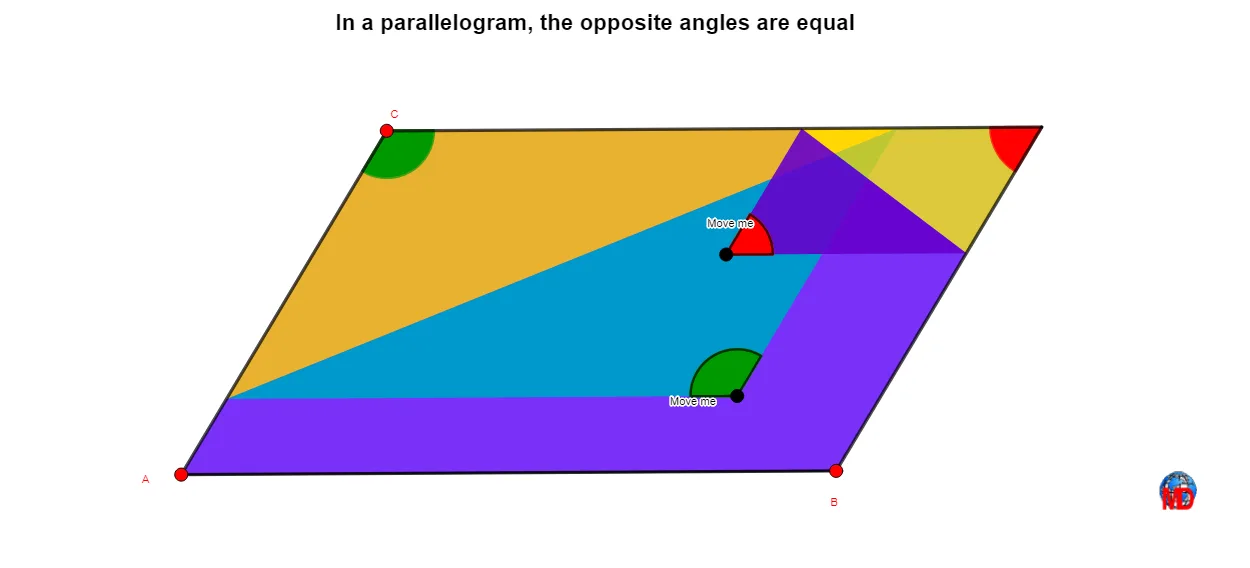
This example demonstrates the property of equal opposite angles in a parallelogram. Key mathematical concepts include the properties of parallelograms and angles. Using GeoGebra commands such as Line, Intersect, Polygon, Segment, and Point, a dynamic parallelogram is constructed to observe the property of equal opposite angles. Suitable for middle school and above students to learn geometric construction and explore the properties of parallelograms.
GeoGebra Commands & Parameters
Line(C, A) → gLine(B, g) → iLine(A, B) → fLine(C, f) → hIntersect(i, h) → DPolygon(A, B, D, C) → q1, a, b, d, cSegment(C, B) → jPoint(j) → EMidpoint(C, E) → FSegment(D, A) → kLine(F, k) → lIntersect(d, l) → GIntersect(l, c) → HPolygon(E, H, G) → t1, g_1, e, h_1Polygon(G, D, B, A, H) → poly1, g_2, d_1, b_1, a_1, h_2Angle(G, E, H) → αAngle(A, C, D) → βPoint(k) → IMidpoint(O, I) → JLine(J, j) → mIntersect(m, d_1) → KIntersect(d, m) → LPolygon(L, I, K) → t2, k_1, l_1, i_1Angle(C, D, B) → γAngle(B, A, C) → δAngle(D, B, A) → εAngle(L, I, K) → ζPolygon(L, K, B, A, C) → poly2, l_2, k_2, b_2, a_2, c_1Polygon(L, D, K) → t3, k_3, l_3, d_2Angle(L, I, K) → ηAngle(G, E, H) → θPolygon(G, H, C) → t4, c_2, g_3, h_3
AI Drawing Prompt Reference
Draw a parallelogram by first creating two intersecting lines as one pair of opposite sides, then determining the fourth vertex via the intersection, and connecting all four vertices. On one diagonal, pick a point and connect it to the midpoint of another diagonal, forming several triangles and labeling their angles. On the other diagonal, pick another point, construct its midpoint, and draw a line through it, creating more triangles with labeled angles. The final figure illustrates equal opposite angles in the parallelogram and related angle properties in the triangles.
The prompt above was compiled from the original drawing commands and is for reference only.