
Open Middle Percent Modeling: Converting Percents to a Geometric Fraction Model
Loading the math board and drawing, please wait…
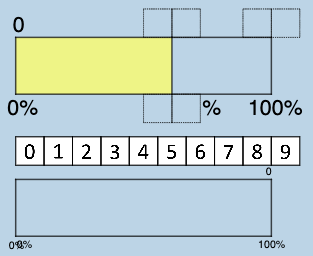
This GeoGebra example visualizes an “open middle percents” problem by converting a percent-based ratio relationship into a geometric fraction/length model. It demonstrates how unknown middle quantities can be expressed via proportional segments and fraction identities, making the percent structure visible rather than purely symbolic. Key concepts include percentages and their conversion to fractions, ratio and segment division, and modeling workflows that may connect to sequences/series-style reasoning and function-based checks (e.g., using functions and possibly logarithmic relationships when appropriate). Construction highlights from the provided setup: it uses GeoGebra commands Polygon to build the geometric framework, Point to define key labeled vertices (such as H2, A2, A0 and others), and Segment to create measurable divider lines; FractionText is employed to display the fraction/percent correspondence directly on the diagram. The construction also organizes multiple derived polygon objects (e.g., poly0/poly3/poly7) and uses function objects (f, g, h, i and related variables) to structure the model and verify constraints. Suitable for advanced secondary students, enrichment/problem-solving contexts, and introductory modeling lessons that connect arithmetic percent reasoning with geometry construction and (when needed) graph/function interpretation.
GeoGebra Commands & Parameters
Polygon(A0, B, 4) → poly0, f, g, h, i, A, CPolygon(A3, H, 4) → poly3, j, k, l, m, E, GPolygon(A7, P, 4) → poly7, n, p, q, r, I, KPolygon(A1, D, 4) → poly1, s, t, a, b, M, OPolygon(A6, N, 4) → poly6, c, d, e, f_1, Q, SPolygon(A2, H2, 4) → poly2, k_1, l_1, m_1, n_1, W, ZPolygon(A8, A8 + (2, 0), 4) → poly8, g_1, h_1, i_1, j_1, U, VPolygon(A9, T, 4) → poly9, p_1, q_1, r_1, s_1, A_1, B_1Polygon(A4, J, 4) → poly4, t_1, a_1, b_1, c_1, C_1, D_1Polygon(A5, L, 4) → poly5, d_1, e_1, f_2, g_2, E_1, F_1Polygon(K_1, L_1, 4) → poly10, l_2, m_2, n_2, p_2, M_1, N_1Polygon(O_1, P_1, 4) → poly12, q_2, r_2, s_2, t_2, Q_1, R_1Polygon(S_1, T_1, 4) → poly13, a_2, b_2, c_2, d_2, U_1, V_1Polygon(C_2, D_2, 4) → poly15, i_3, j_3, k_3, l_3, E_2, F_2Polygon(G_2, H_2, 4) → poly16, m_3, n_3, p_3, q_3, I_2, J_2Polygon(G_{3}, H_{3}, 4) → poly17, m_{4}, n_{4}, p_{4}, q_{4}, I_{3}, J_{3}Polygon(C_{3}, D_{3}, 4) → poly14, i_{4}, j_{4}, k_{4}, l_{4}, E_{3}, F_{3}FractionText(u) → text4Point(xAxis) → Q_2Polygon(A_2, Q_2, R_2, P_2) → q1, h_2, i_2, j_2, k_2Segment(A_2, B_2) → e_2Segment(B_2, O_2) → f_3Segment(O_2, P_2) → g_3Segment(P_2, A_2) → h_3Segment(R_2, Q_2) → r_3Point(yAxis) → S_2Segment(S_2, T_2) → s_3Segment(T_2, U_2) → t_3Point(yAxis) → V_2Segment(U_2, V_2) → a_3Segment(V_2, S_2) → b_3Polygon(S_2, Z_2, A_3, V_2) → q2, c_3, z_2, d_3, v_2Segment(A_3, Z_2) → e_3
AI Drawing Prompt Reference
Create a geometric model composed of multiple square grids, each containing or bordered by fraction or percent text. The layout shows a series of neatly arranged squares, some connected or divided by line segments to illustrate proportional relationships. Include several vertices and auxiliary segments to demonstrate the correspondence between percentages and geometric fraction models. Place points near the coordinate axes and draw several polygonal regions, some with four vertices and others enclosed by segments. The overall figure emphasizes visualizing percent conversion through geometric construction, with functions or curves as auxiliary checks.
The prompt above was compiled from the original drawing commands and is for reference only.