
Area Model for Multiplying 3-Digit by 2-Digit Numbers
Loading the math board and drawing, please wait…
In collections
Multiplication with Area Models
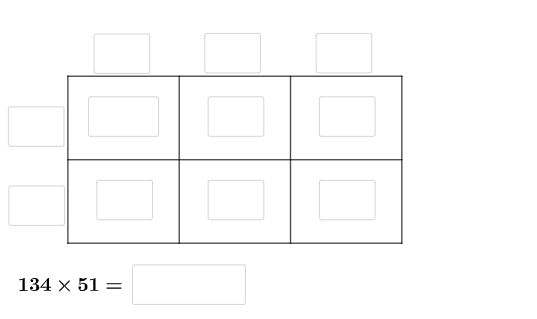
This GeoGebra example visually demonstrates how to multiply a 3-digit number by a 2-digit number using an area (rectangular region) model. By decomposing the numbers into tens/ones and hundreds/tens parts, it builds a partitioned plane whose sub-areas correspond to the partial products, and the total area represents the final multiplication result. The key mathematics concepts include algebraic decomposition for place values, interpreting multiplication as area, and organizing partial products through geometric subdivision (area-sum structure underlying polynomial expansion). Construction highlights from the provided build: it uses Intersect and Point to compute and place critical intersection points; Polygon and Segment to draw the partitioned regions and their boundaries; Textfield to label parts (e.g., place-value components and products); Random to generate varying quiz parameters; and If to conditionally control what is displayed or how certain elements are set. Named objects such as A–L, q1–q6, a2, e, g, l2, q2, f2, and others represent vertices and annotations for the region layout. Suitable for upper elementary through middle school, especially for students learning to connect multiplication algorithms with area models and for interactive practice/quizzing.
GeoGebra Commands & Parameters
Intersect(xAxis, yAxis) → APoint(xAxis) → BPoint(yAxis) → DPoint(xAxis) → EPoint(xAxis) → FPoint(yAxis) → LPolygon(A, E, G, L) → q1, a_{2}, e, g_{4}, l_{2}Polygon(E, F, H, G) → q2, e_1, f_{2}, h_{4}, g_1Polygon(F, B, I, H) → q3, f_1, b_{2}, i, h_1Polygon(H, I, C, K) → q4, h_2, i_1, c_{2}, k_{2}Polygon(G, H, K, J) → q5, g_2, h_3, k_1, j_{2}Polygon(L, G, J, D) → q6, l_1, g_3, j_1, d_{2}Segment(A, B) → m_{2}Segment(B, C) → n_{2}Segment(C, D) → pSegment(D, A) → qSegment(L, I) → rSegment(J, E) → sSegment(K, F) → tRandom(1, 9) → oRandom(1, 9) → uRandom(1, 9) → vRandom(1, 9) → wRandom(1, 9) → a_1Random(1, 9) → b_1Textfield(d_1) → aTextfield(m_1) → bTextfield(n_1) → cTextfield(t_1) → dTextfield(u_1) → fTextfield(o_1) → gTextfield(p_1) → hTextfield(q_1) → jTextfield(r_1) → kTextfield(s_1) → lTextfield(ansguess) → nIf(d_1 ≟ (100 * o), "√", "X") → text1If(m_1 ≟ (10 * u), "√", "X") → text2If(n_1 ≟ v, "√", "X") → text3If(t_1 ≟ (10 * w), "√", "X") → text4If(u_1 ≟ a_1, "√", "X") → text5Textfield(v_1) → mIf(ansguess ≟ produc, "☺", "☹ ") → text7
AI Drawing Prompt Reference
Create an area model diagram on a Cartesian plane for multiplying a three-digit number by a two-digit number. Draw the x- and y-axes, take their intersection as a main vertex, and mark several additional points on the axes to serve as endpoints of the partition boundaries. Using these vertices, construct multiple adjacent quadrilateral regions that tile a larger rectangular frame, with shared edges forming the subdivision that represents partial products. Add key segments to show the internal dividing lines between relevant vertices. Place text labels inside the appropriate sub-areas to indicate place-value components, partial products, and the final result, and leave space for small check/cross-style feedback symbols for correctness of each part.
The prompt above was compiled from the original drawing commands and is for reference only.