
Calculating Areas of Rectangles: Interactive Practice
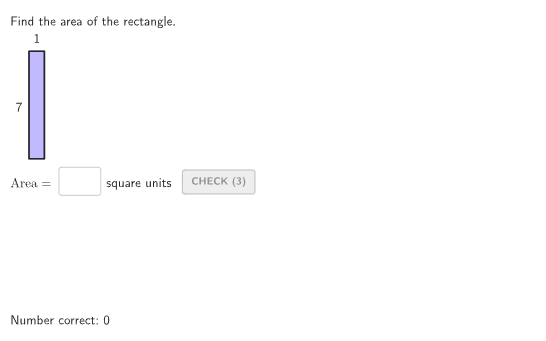
Loading the math board and drawing, please wait…
This GeoGebra example demonstrates how to calculate the area of a rectangle given its side lengths. It focuses on the core mathematical concept of the area formula (Area = length × width) and reinforces understanding of square units. The construction uses commands such as RandomUniform to generate random side lengths, Textfield and InputBox for user input, If, Take, and Zip for conditional logic and data processing, and Corner, PointToPixels for layout and text positioning. It is designed for grades 4-5 students to practice area calculations, suitable for classroom use or independent learning. The resource is verified and includes a Spanish translation option.
GeoGebra Commands & Parameters
RandomUniform(0, 0.99, 200) → allRandomSeeds, {0.07287094196773597, 0.35851411687519313, 0.19185373515411677, 0.3560648070651423, 0.9499242305196738, 0.7337622757420196, 0.7527679252434598, 0.7991231348417204, 0.27392236270239173, 0.12287232996798989, 0.01707165357948234, 0.4585555839229422, 0.47281305183060857, 0.06614761754087212, 0.43316538614961275, 0.41985146219582387, 0.9598294465554408, 0.7011185609656753, 0.2140260009035315, 0.03772583787693068, 0.3932608475849075, 0.819769218042402, 0.7488214117723936, 0.3072523243235457, 0.888515875049514, 0.3149953034949047, 0.7670333659003459, 0.12963279588483598, 0.2873409794698807, 0.4761254316185489, 0.2553376241128383, 0.13543799208821822, 0.36725077468033246, 0.08863900580655303, 0.6492766227189996, 0.6107997727047858, 0.8171070930735853, 0.07070548496562994, 0.5032356480249316, 0.3718697489598444, 0.792352559645764, 0.00884658834330905, 0.1633947979811428, 0.8698802101110682, 0.8256601845450596, 0.38688873740431706, 0.3791788921863172, 0.3233527372101405, 0.6657033382129721, 0.6864256403150127, 0.359264620566966, 0.5153956260495063, 0.47838222475578485, 0.9132513159563692, 0.21842896125199454, 0.5126162975211352, 0.11116048043997584, 0.20265108604980314, 0.9714345856160954, 0.10794530230289816, 0.3221719226243927, 0.37705400946927076, 0.9197479898782103, 0.09262798647338301, 0.42145069472326174, 0.32235235475774493, 0.5461730170525887, 0.1727867378491256, 0.2420187735363564, 0.8841843803625457, 0.3714572488542143, 0.05328975511087871, 0.2636331445030965, 0.962654073133322, 0.6955903331942259, 0.9561848661321026, 0.5617514097090957, 0.12332698564297974, 0.6348636607046009, 0.4526649082371493, 0.318716871461358, 0.6638939825101002, 0.8237972136614307, 0.6864285987354567, 0.8532959927501195, 0.8896348501643867, 0.9687645971281313, 0.9423839514597918, 0.6585191081760549, 0.2667414319173108, 0.6075589090263926, 0.24791332064546923, 0.1862807168911605, 0.11067564859073659, 0.5362420866865969, 0.24437815954410277, 0.16035001948212305, 0.3170396693067986, 0.041407118502959646, 0.6441874791569069, 0.8173222000263, 0.9849263512524925, 0.23245752058887387, 0.38358893621269613, 0.5776099022970563, 0.7873958945142924, 0.9646701860670291, 0.6633618842321948, 0.7358300891996529, 0.020589178140766478, 0.24965759405176421, 0.9388016440541816, 0.31188480359722537, 0.07204190529147736, 0.3753825018545481, 0.4267801352823297, 0.33066519297790314, 0.010002992408951954, 0.1431024309373546, 0.5012522180882714, 0.7996265051666189, 0.3589892483403042, 0.7335341616459179, 0.9093486077781157, 0.1794877402680229, 0.23242292599392322, 0.48912702008045084, 0.008155072000664369, 0.16400284217993463, 0.0010019058400340052, 0.33362186717288705, 0.6574243335232965, 0.8701312476651867, 0.5654421695724392, 0.524046623338901, 0.8858007064840505, 0.5100041345920351, 0.28441042202237954, 0.3339616111075641, 0.08765946616078701, 0.17083808594205604, 0.0028291546532526225, 0.26011736491719095, 0.09437146231390921, 0.04839191230186547, 0.7822904486527155, 0.9277248301967422, 0.23770039282880717, 0.9336926629528555, 0.024053433054207884, 0.9722626988764973, 0.2541237612107714, 0.8815755876695749, 0.29602951808374983, 0.9681580614520049, 0.9071403384356939, 0.7930883061873415, 0.7382739757618368, 0.17677691274905688, 0.8100855942888388, 0.17200335224391236, 0.8368051186285999, 0.7579478364913296, 0.40462360460701785, 0.30856347458116834, 0.7430631742945136, 0.24071644530686356, 0.7899171364499123, 0.9711528996461145, 0.4659978882957371, 0.040191239874621774, 0.35449992834611355, 0.11884353771532451, 0.005639919891160636, 0.5081899182399311, 0.3970835046851457, 0.0347081113219359, 0.6610630827695724, 0.30593329857113555, 0.45392762616296045, 0.49142384790011323, 0.3718853608177843, 0.4972581244868456, 0.8089877525497428, 0.28700760952710497, 0.6608839345251215, 0.9807320783417802, 0.9888235882762605, 0.06953027689168018, 0.5359146909856082, 0.3886544672887342, 0.8072126688325523, 0.8053510413430887, 0.002130095840899352, 0.09021232225089844, 0.4745588550283253, 0.7657928320954384, 0.3704782530018644, 0.12503715909404334, 0.004519671839700301}Textfield(input1) → InputBox1If(animateControl ≟ 1, "unit", "units") → textUnitPluralTake(allRandomSeeds, randIndex, randIndex + numRandoms - 1) → currentRandomSeedsTextfield(input2) → InputBox2Zip(Defined[IndexOf[tt, textInput]], tt, {"+", "-", "*", "/", " ", "(", ")"}) → formatCheckerCorner(5) → layoutAppSizePointToPixels(Corner[onboardingDisplayText, 2], Corner[1], Corner[3], Corner[5]) → layoutOnboardingonboardingTextOffset(Corner[onboardingText, 1], Corner[onboardingText, 3], onboardingCase, Corner[1], Corner[3], Corner[5]) → OnboardingTextOffsetIf(isSquare, "square", "rectangle") → typeTextmakeBox(startRectangle, rectangleWidth, rectangleHeight) → rectangleOutlineText(rectangleWidth, startRectangle + (rectangleWidth / 2, 0), true, true, 0, 1) → labelWidthText(rectangleHeight, startRectangle + (0, ((-rectangleHeight)) / 2, 0), true, true, -1, 0) → labelHeightFlatten(Sequence[Sequence[startRectangle - (0, (boxWidth * (rectangleHeight - 1))) + ((k * boxWidth), (j * boxWidth)), k, 0, rectangleWidth - 1], j, 0, rectangleHeight - 1]) → boxPointsZip(makeBox[K, boxWidth, boxWidth], K, Take[boxPoints, 1, animateControl]) → boxes
AI Drawing Prompt Reference
Draw a rectangle with randomly generated length and width. Label the length and width on both sides of the rectangle, with units also randomly generated. Create multiple identical rectangles and connect them with lines to form a grid. Users can input the length and width of the rectangle and click the animate button to show or hide the rectangles.
The prompt above was compiled from the original drawing commands and is for reference only.