
Open-Middle Construction for Equal Ratios
Loading the math board and drawing, please wait…
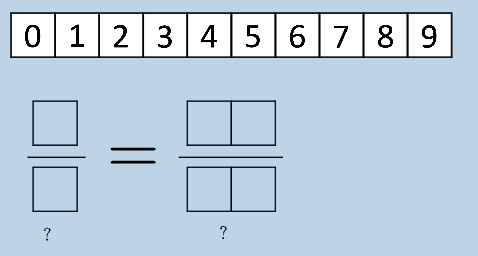
This example uses an open-middle style geometric construction (center/median-line idea) to demonstrate how equal ratios arise from carefully aligned segment markings. Students can observe how two interval/segment scales translate into matching fraction-based proportions, with labels making the “equal ratios” claim visually verifiable. Key math concepts include fractions as quantitative units, ratio and proportional reasoning (equal ratios), and the median-line/segment correspondence viewpoint that turns geometry structure into an arithmetic proportion. Construction highlights reflected in the GeoGebra command summary: Polygon to build the governing polygonal framework; FractionText to display ratio quantities as fractions; If to control conditional construction logic; and Textfield to provide editable or computed explanatory text. The diagram is assembled from multiple points, segments, and intermediate objects (e.g., poly* polygons and auxiliary constructed items), which together enforce the proportional alignment that yields the equal-ratio results. Suitable for middle to high school (especially lessons on ratios, fractions, and geometry-to-arithmetic connections) and for open-ended inquiry activities.
GeoGebra Commands & Parameters
Polygon(A0, B, 4) → poly0, f, g, h, i, A, CPolygon(A3, H, 4) → poly3, j, k, l, m, E, GPolygon(A7, P, 4) → poly7, n, p, q, r, I, KPolygon(A1, D, 4) → poly1, s, t, a, b, M, OPolygon(A6, N, 4) → poly6, c, d, e, f_1, Q, SPolygon(A2, H2, 4) → poly2, k_1, l_1, m_1, n_1, W, ZPolygon(A8, A8 + (2, 0), 4) → poly8, g_1, h_1, i_1, j_1, U, VPolygon(A9, T, 4) → poly9, p_1, q_1, r_1, s_1, A_1, B_1Polygon(A4, J, 4) → poly4, t_1, a_1, b_1, c_1, C_1, D_1Polygon(A5, L, 4) → poly5, d_1, e_1, f_2, g_2, E_1, F_1Polygon(K_1, L_1, 4) → poly10, l_2, m_2, n_2, p_2, M_1, N_1Polygon(O_1, P_1, 4) → poly12, q_2, r_2, s_2, t_2, Q_1, R_1Polygon(S_1, T_1, 4) → poly13, a_2, b_2, c_2, d_2, U_1, V_1Polygon(C_2, D_2, 4) → poly15, i_3, j_3, k_3, l_3, E_2, F_2Polygon(G_2, H_2, 4) → poly16, m_3, n_3, p_3, q_3, I_2, J_2Polygon(G_{3}, H_{3}, 4) → poly17, m_{4}, n_{4}, p_{4}, q_{4}, I_{3}, J_{3}Polygon(C_{3}, D_{3}, 4) → poly14, i_{4}, j_{4}, k_{4}, l_{4}, E_{3}, F_{3}FractionText(u) → text4If(aleft > aright, "Left side is bigger.", aleft < aright, "Right side is bigger", "Both sides are equal!") → text9Textfield(w) → InputBox1If(o_1 < 0, "less than", o_1 > 0, "greater than", o_1 ≟ 0, "equal to") → text12If(round(o, 8) ≟ o, "=", "≈") → text17If(round(w_1, 6) ≟ w_1, "=", "≈") → text18
AI Drawing Prompt Reference
This is a geometric construction based on the center/median-line idea to demonstrate equal ratios. The figure consists of multiple polygon frameworks that align proportionally to show equal ratios. It includes fraction text to display ratio quantities as fractions, and conditional text fields and an editable text box to explain the ratio relationships. The construction order is to first build the polygon frameworks, then add fraction text and conditional text fields to make the equal ratio results visually verifiable.
The prompt above was compiled from the original drawing commands and is for reference only.