
Geometric Fractions from Line and Rectangle Splits
Loading the math board and drawing, please wait…
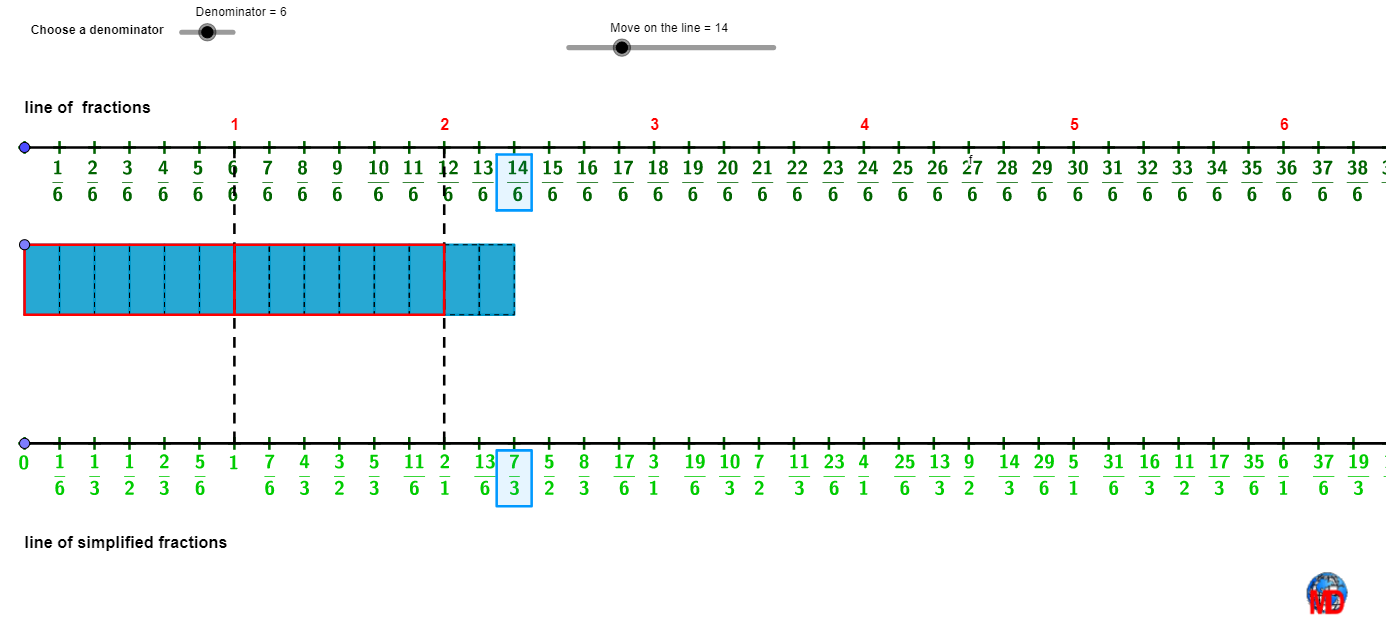
This example demonstrates how “fractions” (ratios) can be visualized through the interplay between a line and a rectangle—showing how the represented numerator/denominator quantities change under conditional or parameter-driven choices. It connects the geometric meaning of fractions and proportional reasoning with ideas related to conditional probability, often using segment- or area-based quantities as the underlying measure. The construction also ties in function-based behavior via quadratic and sine-related components, and uses bar-chart style comparisons to reflect the varying values. Construction highlights from the GeoGebra setup: Sequence is used to generate parameter sequences; Segment, Line, and Point define the key geometric features; Polygon builds the rectangle region; Element and Take manage selections/extractions of geometric objects; Translate creates shifted configurations for comparison; and function objects such as f/g together with variables like Denominator organize the computed fraction/probability-style values. Designed for school-level to early undergraduate learning, especially for interactive geometry, graphing, and conceptual links between functions and ratio/probability interpretations.
GeoGebra Commands & Parameters
Sequence(A + ((i * Distance[A, L]), 0), i, 0, x(B)) → l2Segment(A, B) → fLine(A, yAxis) → gPoint(g) → CPolygon(C, D, F, E) → q1, c, d, f_1, eSegment(A, C) → hElement(l2, Denominator + 1) → GTranslate(l2, Vector[A, C]) → l2'Translate(l2, Vector[A, E]) → l2'_{1}Sequence(Polygon[Element[l2', i], Element[l2', i + 1], Element[l2'_{1}, i + 1], Element[l2'_{1}, i]], i, 1, Length[l2]) → l3Take(l3, 1, b) → l4Point(g) → HSegment(H, I) → jSequence(H + ((i * Distance[A, L]), 0), i, 0, x(B)) → l5Element(l5, Denominator + 1) → JSequence(Text["\frac{" + (k) + "}{" + Denominator + "}", Element[l2, k + 1] - (0.35, 0.25), true, true], k, 1, x(B)) → l1bSequence(Polygon[Translate[C, Vector[(i * Vector[A, K])]], Translate[D, Vector[(i * Vector[A, K])]], Translate[F, Vector[(i * Vector[A, K])]], Translate[E, Vector[(i * Vector[A, K])]]], i, 1, 5) → l6Take(l6, 1, floor(b / Denominator) - 1) → l7Sequence(A + ((i * Distance[A, K]), 0), i, 1, x(B)) → l8Sequence(Text[i, Element[l8, i] + (-0.1, 0.5)], i, 1, x(B)) → l9Segment(K, J) → lSequence(Segment[Translate[K, Vector[(i * Vector[A, K])]], Translate[J, Vector[(i * Vector[A, K])]]], i, 1, x(B)) → l10Take(l10, 1, floor(b / Denominator) - 1) → l11Sequence(A + (Distance[A, L] / 2, 0) + ((i * Distance[A, L]), 0), i, 0, x(B)) → l2bTake(l2b, b, b + 1) → l12Polygon(Element[l12, 1] - (0, 0.2), Element[l12, 2] - (0, 0.2), Element[l12, 2] - (0, 1.8), Element[l12, 1] - (0, 1.8)) → q2, i, k, m, nTranslate(q2, Vector[A, H]) → q2'Take(l3, 1, b) → l13Sequence(Text[If[i ≟ 0, "0", If[i ≟ Denominator, "1", "\frac{" + (i / GCD[i, Denominator]) + ("}{" + (Denominator / GCD[i, Denominator]) + "}")]], Element[l5, i + 1] + (-0.3, -0.2), true, true], i, 0, x(B)) → l1
AI Drawing Prompt Reference
Please draw a geometric figure to visualize fractions and probabilities. The figure should include a rectangular region, a series of movable rectangles and line segments generated through parameter sequences, representing different fractions and probability values. Text labels should display the specific numerical values. The construction order should be: first draw the basic rectangle, then generate parameter sequences and create movable rectangles and line segments, and finally add text labels to show the values. The figure aims to help understand the geometric meaning of fractions and probabilities, illustrating the relationships between different configurations.
The prompt above was compiled from the original drawing commands and is for reference only.