
Arithmetic on the Clock Face (I): Testing Substitution Invariance
Loading the math board and drawing, please wait…
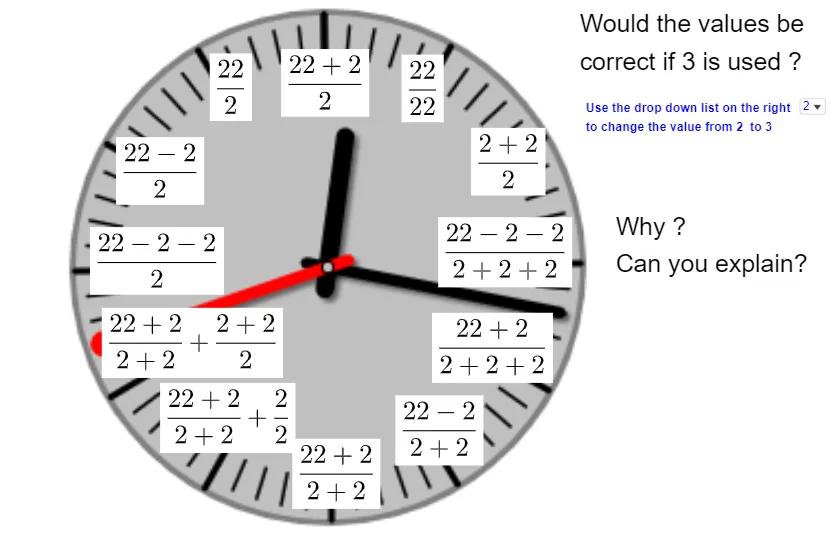
This GeoGebra activity demonstrates how arithmetic on a clock-face representation can be verified visually: students compute first, then check whether substituting the corresponding values changes the final result. It highlights core ideas behind correctness checking in arithmetic, geometric encoding of number states via point locations, and structural constraints reminiscent of median-line style reasoning (using constructed relationships among key points). Construction centers on GeoGebra commands Circle, Ellipse, and Polygon to build the circular/elliptical clock geometry and polygonal structures, along with point sets A, B, C–J and their associated labels (text1–text12). The activity also uses numlist and clockfacenonumber to map arithmetic inputs to clock-face positions, enabling side-by-side comparison between the predicted arithmetic outcome and the geometric consequence. Suitable for middle and high school students, as an inquiry-based lesson on algebraic verification, geometric construction, and modeling of arithmetic relationships.
GeoGebra Commands & Parameters
Circle(C, D) → cCircle(E, F) → dCircle(G, H) → eEllipse(I, J, K) → fEllipse(L, M, N) → gCircle(O, P) → hCircle(Q, R) → kEllipse(S, T, U) → pEllipse(V, W, Z) → qEllipse(A_1, B_1, C_1) → rCircle(D_1, E_1) → sCircle(F_1, G_1) → tPolygon(T_1, (x(T_1) + 3.5, y(T_1)), (x(T_1) + 3.5, y(T_1) + 2.5), (x(T_1), y(T_1) + 2.5)) → poly1, i, j, l, m
AI Drawing Prompt Reference
Draw a clock face with two circles and three ellipses. First, draw two circles with centers at points C and D, and E and F respectively. Then, draw three ellipses with foci at points I, J, K; L, M, N; and A_1, B_1, C_1. Finally, draw a quadrilateral with vertices at T_1, (x(T_1) + 3.5, y(T_1)), (x(T_1) + 3.5, y(T_1) + 2.5), and (x(T_1), y(T_1) + 2.5).
The prompt above was compiled from the original drawing commands and is for reference only.