
A Rotation–Sector Construction Linking Ratios, Expected Value, and Frequency Dis
Loading the math board and drawing, please wait…
In collections
Thin Slice: Special Triangle Theorems (1B)
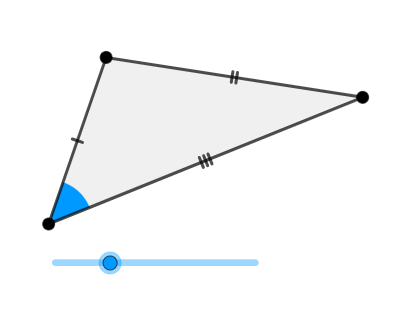
This GeoGebra task demonstrates how rotating rays and constructing circles and circle sectors can visually encode statistical ideas such as ratios, expected value (expected value representation/weighting), exponent-based weighting, and frequency distribution. The underlying math concepts include Ratios, Expected Value, Exponent, and Frequency Distribution, with geometric measurements connected to the Pythagorean Theorem for consistent length/scale relationships. Construction highlights: it uses Rotate, Ray, Point, Segment, Circle, Intersect, Polygon, and CircleSector to place key points, draw rays and segments, create circles, compute intersection points to anchor the structure, and build polygonal regions and sector shapes that act as the geometric metaphor for frequency/weights. The construction is suitable for secondary-level math enrichment, probability & statistics visualization, and curriculum units that connect geometry, measurement, and model-based interpretation.
GeoGebra Commands & Parameters
Rotate(B, (a * pi / 180), A) → B'Ray(A, B') → fPoint(f) → CSegment(B, A) → gSegment(C, A) → hSegment(C, B) → iCircle(A, (0.25 * Min[{g, h, i}])) → cIntersect(c, g, 1) → DIntersect(c, h, 1) → EPolygon(A, B, C) → t1, c_1, a_1, bCircleSector(A, D, E) → d
AI Drawing Prompt Reference
Draw a figure consisting of rotated rays and circular arcs. Include a rotated ray, a circle, an arc, and some points. The arc intersects the ray to form a region. Points mark key positions. The construction order is: rotate the ray, draw the ray, determine points, draw the circle, calculate intersection points, and finally draw the arc and region.
The prompt above was compiled from the original drawing commands and is for reference only.