
Spielkarte 2: Fun Exploration of Geometry and Probability
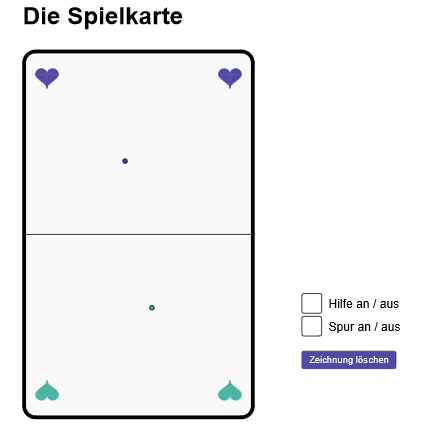
Loading the math board and drawing, please wait…
This example demonstrates the connection between geometric shapes and probability distributions through symmetry and randomness. Key mathematical concepts include symmetry, probability distribution, and geometric construction. The construction involves GeoGebra commands such as Polygon, PointIn, Circle, etc. Suitable for high school students or math enthusiasts to understand the relationship between geometry and probability.
GeoGebra Commands & Parameters
Polygon(Midpoint[K_1, K_4], Midpoint[K_2, K_3], K_3, K_4) → oben, h1, h2, h3, h4PointIn(oben) → PSegment(Midpoint[K_1, K_4], Midpoint[K_2, K_3]) → mMidpoint(m) → MPolygon(K_1, K_2, K_3, K_4) → Karte, k_1, k_2, k_3, k_4Circle(K_1, epsilon) → kreis_1Intersect(kreis_1, k_1) → K_{11},Intersect(kreis_1, k_4) → K_{12},CircleArc((x(K_1) + epsilon, y(K_1) + epsilon), K_{12}, K_{11}) → kreisbogen_1Circle(K_2, epsilon) → kreis_2Circle(K_3, epsilon) → kreis_3Circle(K_4, epsilon) → kreis_4Intersect(kreis_2, k_1) → K_{22},Intersect(kreis_2, k_2) → K_{21},Intersect(kreis_4, k_3) → K_{42},Intersect(kreis_3, k_2) → K_{32},CircleArc((x(K_2) - epsilon, y(K_2) + epsilon), K_{22}, K_{21}) → kreisbogen_2Intersect(kreis_4, k_4) → K_{41},Intersect(kreis_3, k_3) → K_{31},CircleArc((x(K_3) - epsilon, y(K_3) - epsilon), K_{32}, K_{31}) → kreisbogen_3CircleArc((x(K_4) + epsilon, y(K_4) - epsilon), K_{42}, K_{41}) → kreisbogen_4Segment(K_{11}, K_{22}) → k1Segment(K_{21}, K_{32}) → k2Segment(K_{31}, K_{42}) → k3Segment(K_{41}, K_{12}) → k4If(fractionalPart(n / 2) ≟ 0, false, true) → spurSemicircle(H_2, H_3) → herz_{ol}Semicircle(H_3, H_4) → herz_{or}IntegralBetween(f_3, f_1, x(H_2), x(H_3)) → herzlinksIntegralBetween(f_3, f_2, x(H_3), x(H_4)) → herzrechtsMirror(K_1, m) → AMirror(K_2, m) → BMirror(K_3, m) → CMirror(K_4, m) → DMirror(herz_{ol}, m) → eMirror(herz_{or}, m) → fIntegralBetween(g_1, g_3, x(H_2), x(H_3)) → herzuntenlinksIntegralBetween(g_2, g_3, x(H_3), x(H_4)) → herzuntenrechtsMirror(herz_{ol}, s) → cMirror(herz_{or}, s) → dMirror(e, s) → e'Mirror(f, s) → f'IntegralBetween(f_3, h_1, x(H_2) + breite - (2 * x(H_1)), x(H_3) + breite - (2 * x(H_1))) → zrehlinksIntegralBetween(f_3, h_2, x(H_3) + breite - (2 * x(H_1)), x(H_4) + breite - (2 * x(H_1))) → zrehrechtsIntegralBetween(i_1, g_3, x(H_2) + breite - (2 * x(H_1)), x(H_3) + breite - (2 * x(H_1))) → zrehuntenlinksIntegralBetween(i_2, g_3, x(H_3) + breite - (2 * x(H_1)), x(H_4) + breite - (2 * x(H_1))) → zrehuntenrechtksMirror(P, M) → P'Segment(P, P') → hilslinie
AI Drawing Prompt Reference
Draw a rectangular playing card with rounded corners at each vertex. Inside, connect midpoints of opposite sides to form a central axis, and mark the midpoint of this axis as the center. Place a random point on the card, then draw its reflection across the center and connect them with a line. Symmetrically arrange four heart shapes around the card, each composed of two semicircles and two curved regions, creating a balanced geometric and probabilistic design.
The prompt above was compiled from the original drawing commands and is for reference only.