
Exploring Axial Symmetry Playfully
Loading the math board and drawing, please wait…
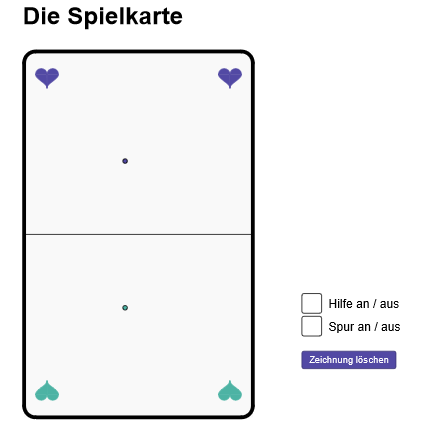
This example demonstrates a playful exploration of axial symmetry through interactive graphics, showcasing the principles of symmetry. Core mathematical concepts include axial symmetry, polygon construction, integral applications, and linear functions. Construction highlights from the GeoGebra command summary involve commands like Polygon, PointIn, Segment, Midpoint, Circle, Intersect, CircleArc, If, Semicircle, IntegralBetween, and Mirror, along with objects such as K_1, hoehe, K_4, breite, K_2, K_3, oben, h1, h2, h3, h4, P, m, M, Karte, k_1, k_2, k_3, k_4, epsilon, kreis_1, K_{11}, K_{12}, kreisbogen_1, kreis_2, kreis_3, kreis_4, K_{22}, K_{21}, K_{42}, K_{32}, kreisbogen_2, K_{41}, K_{31}, kreisbogen_3, kreisbogen_4, k1, k2, k3, k4. Suitable for high school students to learn and understand geometric symmetry, integral calculations, and the dynamic changes of function graphs, ideal for mathematical inquiry lessons or geometric construction teaching.
GeoGebra Commands & Parameters
Polygon(Midpoint[K_1, K_4], Midpoint[K_2, K_3], K_3, K_4) → oben, h1, h2, h3, h4PointIn(oben) → PSegment(Midpoint[K_1, K_4], Midpoint[K_2, K_3]) → mMidpoint(m) → MPolygon(K_1, K_2, K_3, K_4) → Karte, k_1, k_2, k_3, k_4Circle(K_1, epsilon) → kreis_1Intersect(kreis_1, k_1) → K_{11},Intersect(kreis_1, k_4) → K_{12},CircleArc((x(K_1) + epsilon, y(K_1) + epsilon), K_{12}, K_{11}) → kreisbogen_1Circle(K_2, epsilon) → kreis_2Circle(K_3, epsilon) → kreis_3Circle(K_4, epsilon) → kreis_4Intersect(kreis_2, k_1) → K_{22},Intersect(kreis_2, k_2) → K_{21},Intersect(kreis_4, k_3) → K_{42},Intersect(kreis_3, k_2) → K_{32},CircleArc((x(K_2) - epsilon, y(K_2) + epsilon), K_{22}, K_{21}) → kreisbogen_2Intersect(kreis_4, k_4) → K_{41},Intersect(kreis_3, k_3) → K_{31},CircleArc((x(K_3) - epsilon, y(K_3) - epsilon), K_{32}, K_{31}) → kreisbogen_3CircleArc((x(K_4) + epsilon, y(K_4) - epsilon), K_{42}, K_{41}) → kreisbogen_4Segment(K_{11}, K_{22}) → k1Segment(K_{21}, K_{32}) → k2Segment(K_{31}, K_{42}) → k3Segment(K_{41}, K_{12}) → k4If(fractionalPart(n / 2) ≟ 0, false, true) → spurSemicircle(H_2, H_3) → herz_{ol}Semicircle(H_3, H_4) → herz_{or}IntegralBetween(f_3, f_1, x(H_2), x(H_3)) → herzlinksIntegralBetween(f_3, f_2, x(H_3), x(H_4)) → herzrechtsMirror(K_1, m) → AMirror(K_2, m) → BMirror(K_3, m) → CMirror(K_4, m) → DMirror(herz_{ol}, m) → eMirror(herz_{or}, m) → fIntegralBetween(g_1, g_3, x(H_2), x(H_3)) → herzuntenlinksIntegralBetween(g_2, g_3, x(H_3), x(H_4)) → herzuntenrechtsMirror(herz_{ol}, s) → cMirror(herz_{or}, s) → dMirror(e, s) → e'Mirror(f, s) → f'IntegralBetween(f_3, h_1, x(H_2) + breite - (2 * x(H_1)), x(H_3) + breite - (2 * x(H_1))) → zrehlinksIntegralBetween(f_3, h_2, x(H_3) + breite - (2 * x(H_1)), x(H_4) + breite - (2 * x(H_1))) → zrehrechtsIntegralBetween(i_1, g_3, x(H_2) + breite - (2 * x(H_1)), x(H_3) + breite - (2 * x(H_1))) → zrehuntenlinksIntegralBetween(i_2, g_3, x(H_3) + breite - (2 * x(H_1)), x(H_4) + breite - (2 * x(H_1))) → zrehuntenrechtksMirror(P, m) → P'Segment(P, P') → hilslinie
AI Drawing Prompt Reference
First construct a quadrilateral in the plane using four base points, then use the midpoints of two diagonals to define a vertical reference and determine upper corner points, forming the top polygonal outline. Take the relevant point-in/diagonal intersection as a center point. Around the four base points draw four equal-radius circles, compute their intersection points with the corresponding lines, and connect the resulting intersection pairs by circular arcs to form a symmetric outer boundary. Create mirror images of the four base points and of the upper semicircular/arc components across a single central line, so the left and right halves correspond. Add the remaining mirrored semicircle arcs in the lower area, draw segments joining each point with its mirror counterpart to show alignment, and include an auxiliary dividing segment. Shade or label the two area regions corresponding to integrals between the left/right curve bounds using the same x-intervals.
The prompt above was compiled from the original drawing commands and is for reference only.