
Solid of Revolution Visualizer
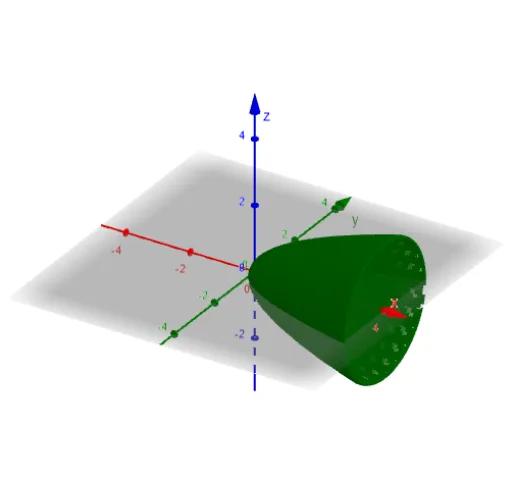
Loading the math board and drawing, please wait…
This example demonstrates the visualization of solid of revolution and its volume calculation. Key math concepts include solids, volume, definite integral, isosceles triangles, quadrilaterals, hyperbolas, and ellipses. It is constructed using GeoGebra commands like Textfield, RectangleSum, Sequence, and objects such as function f, input boxes a/b/c, sequence n, Dx, l1. Suitable for high school students and math enthusiasts learning calculus and solid geometry.
GeoGebra Commands & Parameters
Textfield(f) → InputBox1Textfield(a) → InputBox2Textfield(b) → InputBox3RectangleSum(f(x), a, b, n, 0.5) → cSequence(Cylinder[(k, 0, 0), (k + Dx, 0, 0), f(k + Dx / 2)], k, a, b - Dx, Dx) → l1
AI Drawing Prompt Reference
Create a visualization of a solid of revolution, showing a function curve rotated around an axis to form a 3D shape with volume calculation. Include a function curve, two input boxes for integration limits, and one input box for segment count. Within the interval, divide the solid into a sequence of thin cylindrical slices, each with radius equal to the function value at its midpoint, arranged along the horizontal axis to form a stepped approximation of the solid. Also display a rectangular sum area for approximate volume. The composition should clearly show the relationship between the curve, the cylinder sequence, and the integration interval, suitable for educational demonstration.
The prompt above was compiled from the original drawing commands and is for reference only.