
Open a Pyramid 1: Dynamic Unfolding of a Tetrahedron
Loading the math board and drawing, please wait…
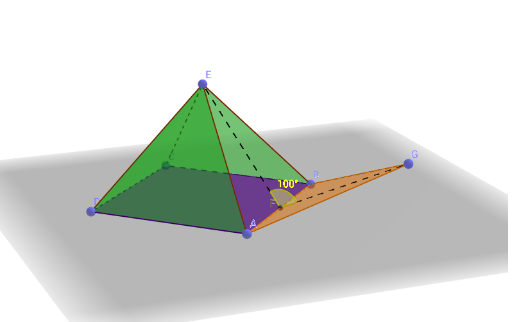
This example demonstrates the unfolding process of a pyramid (tetrahedron) by dynamically opening its lateral faces, allowing users to visualize the relationship between the 3D solid and its 2D net. Core mathematical concepts include solid geometry, pyramid properties, lateral faces, base, edges, vertices, angles, and inscribed circles. Construction highlights: using GeoGebra commands such as Point, Polygon, Pyramid, Circle, Center, Segment, and Angle to build the pyramid's vertices and faces, with objects like A, B, C, D, E, F, G, poly1, poly2, edgeAE, edgeBE, etc., and a slider or dynamic parameter to control the unfolding animation. Suitable for high school or early college students to enhance spatial reasoning, understand nets and surface area calculations, and serve as an interactive teaching tool in mathematics classrooms.
GeoGebra Commands & Parameters
Point(yAxis) → APoint(xAxis) → BPoint(yAxis) → CPoint(xAxis) → DPolygon(A, B, C, D) → poly1, a, b, c, dPoint(zAxis) → EPyramid(poly1, E) → e, faceABE, faceBCE, faceCDE, faceADE, edgeAE, edgeBE, edgeCE, edgeDECircle(a, E) → fCenter(f) → FPoint(f) → GPolygon(A, B, G) → poly2, g, a_1, b_1Segment(E, F) → hSegment(G, F) → iAngle(E, F, G) → α
AI Drawing Prompt Reference
Draw a dynamic unfolding tetrahedron: start with a square base on the coordinate plane, with vertices on the axes. Place an apex above the base center and connect it to form a pyramid. Then construct a rotating triangular face outside one base edge, with its vertex on the circumcircle of the base, linked by segments from the apex to the circle center and from the center to that vertex, plus an angle parameter to control the unfolding. Show the lateral faces opening outward into a flat net, keeping the base, edges, and angle labels visible.
The prompt above was compiled from the original drawing commands and is for reference only.