
Animated Net of a Square Pyramid from Side Triangles
Loading the math board and drawing, please wait…
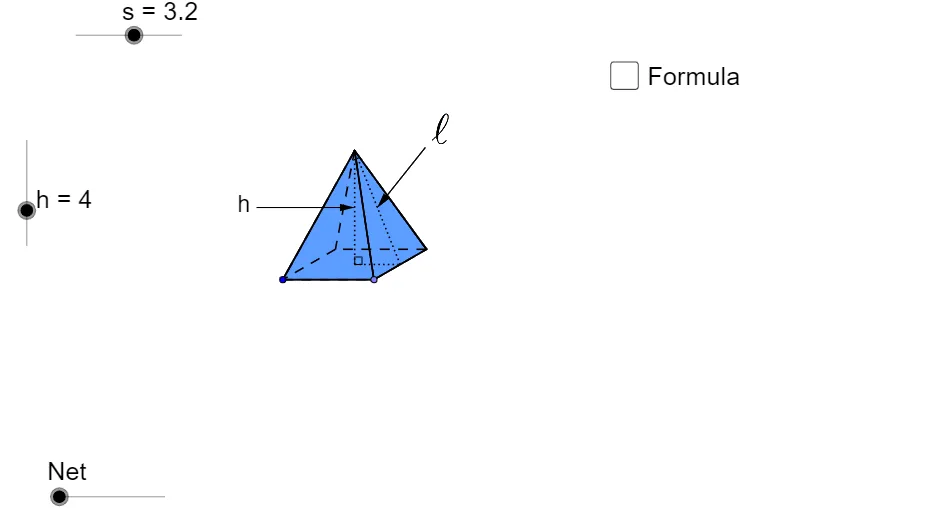
This GeoGebra example demonstrates how a square pyramid’s surface net is built and animated by arranging its congruent side triangles in the plane so that their corresponding edges match. It focuses on solid geometry and geometric construction ideas: the net of a polyhedron, the fact that a square pyramid’s lateral faces are isosceles triangles, and the preservation of edge lengths and angles when the faces are unfolded. The construction uses Point, Segment, Line, Circle, and Intersect to locate key points, edges, and intersection geometry; Rotate and Translate to repeatedly place the side triangle pieces around the base pattern; Polygon to form the planar net regions; Midpoint, OrthogonalLine, Angle, and LineBisector to enforce geometric constraints (symmetry and angle/position relationships); and CircleArc and Ray to define arc-based guidance for the correct layout. It is intended for middle and high school learners studying 3D-to-2D unfolding, polyhedron nets, and hands-on geometric reasoning.
GeoGebra Commands & Parameters
Point(Circle[A, s]) → BSegment(A, B) → aLine(A, B) → b_2Circle(B, (3 * s / 4.5)) → cIntersect(c, b_2, 2) → CRotate(C, 30°, B) → C'Line(C', b_2) → dSegment(B, C') → eLine(A, e) → fIntersect(d, f) → DPolygon(A, B, C', D) → poly1, a_1, b_1, c', d_1Segment(A, C') → gSegment(D, B) → h_1Intersect(g, h_1) → EOrthogonalLine(E, a_1) → iCircle(E, h) → kIntersect(k, i, 2) → FSegment(B, F) → jSegment(C', F) → l_5Segment(F, D) → mSegment(F, A) → nSegment(E, F) → pSegment(A, D) → qMidpoint(b_1) → GSegment(G, F) → rAngle(G, E, F) → αSegment(E, G) → tLine(E, G) → c_1Circle(G, F) → f_1Intersect(f_1, c_1, 2) → HIntersect(c_1, d_1) → ICircle(I, F) → g_1Intersect(g_1, c_1, 1) → JVector(F, J) → uPoint(c') → LCircle(L, F) → q_1Vector(F, H) → wMidpoint(A, B) → KLine(K, E) → e_1Circle(K, h) → p_1Intersect(e_1, c') → MCircle(M, h) → r_1Intersect(r_1, e_1, 2) → NIntersect(p_1, e_1, 1) → OVector(F, N) → vVector(F, O) → zTranslate(F, Vector[(z * o)]) → F'_1Translate(F, Vector[(u * (o - 1))]) → F'_2Translate(F, Vector[(v * (o - 2))]) → F'_3Translate(F, Vector[(w * (o - 3))]) → F'Segment(F, N) → s_{4}LineBisector(s_{4}) → a_2Intersect(a_2, c') → PCircleArc(P, N, F) → c_2Ray(P, F'_3) → d_2Intersect(c_2, d_2, 1) → QSegment(F, O) → e_2LineBisector(e_2) → f_2Intersect(f_2, a_1) → RCircleArc(R, F, O) → g_2Ray(R, F'_1) → h_2Intersect(g_2, h_2, 1) → SCircleArc(I, F, J) → k_2CircleArc(G, H, F) → p_2Ray(I, F'_2) → i_2Intersect(k_2, i_2, 1) → TRay(G, F') → j_2Intersect(p_2, j_2, 1) → UCircle(I, E) → s_1OrthogonalLine(I, a_1) → i_1Intersect(s_1, i_1, 2) → VIntersect(s_1, i_1, 1) → WOrthogonalLine(V, i_1) → j_1OrthogonalLine(W, i_1) → k_1OrthogonalLine(G, k_1) → l_1Intersect(j_1, l_1) → ZIntersect(k_1, l_1) → A_1Midpoint(V, Z) → B_1Midpoint(A_1, W) → C_1Circle(B_1, r) → t_1Circle(C_1, r) → q_2OrthogonalLine(B_1, k_1) → m_1Intersect(t_1, m_1, 1) → D_1Intersect(q_2, m_1, 2) → E_1Vector(C', Z) → u_1Vector(B, A_1) → v_1Vector(N, D_1) → w_1Vector(O, E_1) → z_1Translate(N, Vector[(w_1 * (o - 4))]) → N'Translate(O, Vector[(z_1 * (o - 4))]) → O'Translate(B, Vector[(v_1 * (o - 4))]) → B'Translate(A, Vector[(v_1 * (o - 4))]) → A'Translate(C', Vector[(u_1 * (o - 4))]) → C''Translate(D, Vector[(u_1 * (o - 4))]) → D'If(o < 1, S, If[o < 4, O, If[o < 5, O', E_1]]) → F_1If(o < 1, F, If[o < 2, T, J]) → G_1If(o < 3, F, If[o < 4, U, H]) → H_1If(o < 2, F, If[o < 3, Q, If[o < 4, N, If[o < 5, N', D_1]]]) → I_1If(o < 4, A, If[o < 5, A', W]) → J_1If(o < 4, B, If[o < 5, B', A_1]) → K_1If(o < 4, C', If[o < 5, C'', Z]) → L_1If(o < 4, D, If[o < 5, D', V]) → M_1Polygon(F_1, J_1, K_1) → poly2, k_3, f_3, j_3Polygon(L_1, H_1, K_1) → poly3, k_4, l_2, h_3Polygon(L_1, I_1, M_1) → poly4, m_2, l_3, i_3Polygon(M_1, G_1, J_1) → poly5, j_4, m_3, g_3Intersect(m, j_3) → N_1Segment(I_1, N_1) → n_1Intersect(j_3, i_3) → O_1Intersect(c', i_3) → Q_1Intersect(c', i_3) → R_1Intersect(c', i_3) → S_1Intersect(c', i_3) → U_1Intersect(c', i_3) → A_2Intersect(l_2, i_3) → B_2Segment(B_2, O_1) → n_2Segment(B_2, M_1) → r_2Midpoint(M_1, L_1) → C_2Midpoint(L_1, K_1) → D_2Midpoint(K_1, J_1) → E_2Midpoint(J_1, M_1) → F_2Segment(G_1, F_2) → s_2Segment(C_2, I_1) → t_2Segment(D_2, H_1) → a_3Segment(E_2, F_1) → b_3Polygon(J_1, M_1, L_1, K_1) → poly6, j_5, m_4, l_4, k_5Intersect(j_3, d_1) → P_1Segment(P_1, M_1) → c_3Midpoint(p) → V_1OrthogonalLine(V_1, p) → d_3Point(d_3) → W_1Vector(W_1, V_1) → u_2Midpoint(r) → T_1Midpoint(a_3) → Z_1Point(a_2) → G_2Vector(G_2, T_1) → v_2Vector(G_2, Z_1) → w_2Point(Circle[H_2, s]) → I_2Segment(H_2, I_2) → e_3Line(H_2, I_2) → bCircle(I_2, (3 * s / 4.5)) → p_3Intersect(p_3, b, 2) → J_2Rotate(J_2, 30°, I_2) → K_2Segment(I_2, K_2) → n_3Line(K_2, b) → q_3Line(H_2, n_3) → r_3Intersect(q_3, r_3) → L_2Segment(H_2, K_2) → s_3Segment(I_2, L_2) → t_3Intersect(s_3, t_3) → M_2Circle(M_2, h) → c_4OrthogonalLine(M_2, b) → a_4Intersect(c_4, a_4, 2) → N_2Polygon(H_2, N_2, I_2) → poly7, i_4, h_4, n_4Polygon(I_2, N_2, K_2) → poly8, k_6, i_5, n_5Polygon(H_2, L_2, K_2, I_2) → poly9, h_5, l_6, k_7, i_6Polygon(H_2, N_2, L_2) → poly10, l_7, h_6, n_6Polygon(L_2, N_2, K_2) → poly11, k_8, l_8, n_7Midpoint(k_7) → O_2Segment(M_2, O_2) → b_4Segment(M_2, N_2) → d_4Segment(N_2, O_2) → e_4Angle(O_2, M_2, N_2) → βMidpoint(N_2, M_2) → P_2Midpoint(O_2, N_2) → Q_2Line(P_2, Q_2) → f_4Circle(P_2, s) → g_4Intersect(g_4, f_4, 1) → R_2Intersect(g_4, f_4, 2) → S_2Vector(R_2, P_2) → z_2Vector(S_2, Q_2) → u_3Midpoint(b_3) → V_2
AI Drawing Prompt Reference
Draw the net of a square pyramid by first creating a square base and four isosceles triangular faces. Arrange the triangles around the base by rotating and translating them, ensuring that the edge lengths and angles are preserved to form the correct net.
The prompt above was compiled from the original drawing commands and is for reference only.