
Representing Fractions as Percentages with a Visual Model
Loading the math board and drawing, please wait…
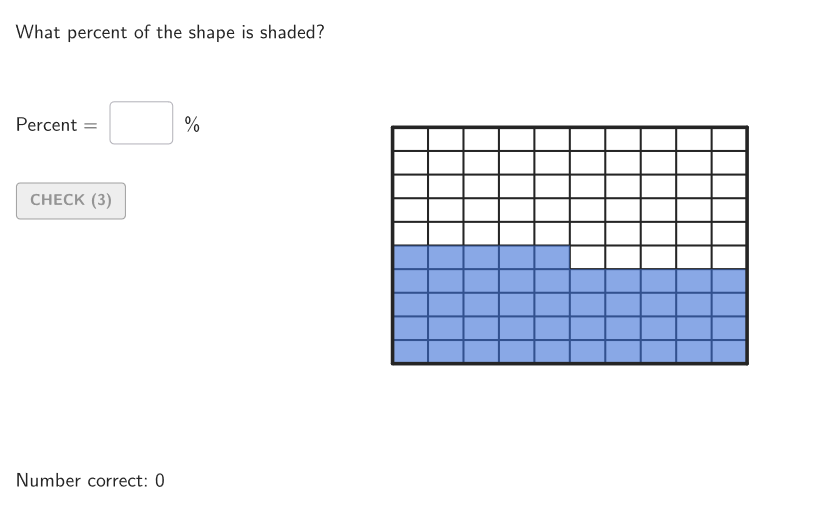
This GeoGebra lesson demonstrates how to convert a fraction from a visual partition model into its equivalent percentage. It focuses on percent as “per 100,” the equivalence between fractions and percentages, and interpreting fractional parts as a hundred-based quantity. The construction uses commands and objects to generate multiple cases and collect user input (Element, Shuffle, Sequence, Take, Textfield, If), then builds a geometric representation of the partitioned whole—typically using circular sector-style division (Circle, Sector, Polygon, Angle, Segment, Intersect). Calculations for mapping the fraction to the correct percentage are supported by arithmetic and indexing operations (Div, Mod), along with dynamic text/answer display and validation (showanswer, showsolution, btnValidate, validate, tries). Suitable for middle school grades (6–8) and for classroom practice on modeling percent and linking it to fractional or decimal values.
GeoGebra Commands & Parameters
Element(allCaseNum, Mod[countQuestion, Length[allCaseNum]] + 1) → caseNumShuffle(Sequence[Point[{(r * cos(((k * 2) * pi / 10))), (r * sin(((k * 2) * pi / 10)))}], k, 0, 9]) → allStartVertCircle, {(-6.472135954999579, 4.702282018339786), (2.472135954999578, -7.608452130361229), (-6.47213595499958, -4.702282018339784), (6.472135954999579, -4.702282018339787), (-2.4721359549995805, -7.608452130361228), (2.4721359549995796, 7.608452130361228), (-2.4721359549995787, 7.608452130361229), (6.47213595499958, 4.702282018339785), (8, 0), (-8, 0)}Element(allStartVertCircle, Mod[countQuestion, Length[allStartVertCircle]] + 1) → V1Element(allEndVertCircle, Mod[countQuestion, Length[allEndVertCircle]] + 1) → V2Shuffle({1, 2, 4, 5, 10}) → allDivOr, {10, 1, 2, 4, 5}Element(allDivOr, Mod[countQuestion, Length[allDivOr]] + 1) → divOrIf(divOr ≟ 1, Shuffle[{1, 2, 4, 5, 10}], divOr ≟ 2, Shuffle[{1, 2, 5, 10}], divOr ≟ 4, Shuffle[{1, 5}], divOr ≟ 5, Shuffle[{1, 2, 5, 10}], divOr ≟ 10, Shuffle[{1, 5, 10}]) → allDivVertElement(allDivVert, Mod[countQuestion, Length[allDivVert]] + 1) → divVertShuffle(Sequence[k, k, 1, (divVert * divOr), 1]) → allNCol, {45, 2, 99, 66, 58, 90, 48, 50, 41, 83, 31, 80, 25, 3, 30, 42, 87, 12, 40, 51, 64, 38, 54, 20, 100, 46, 63, 85, 73, 91, 44, 39, 17, 16, 67, 22, 88, 52, 98, 95, 37, 92, 78, 89, 10, 28, 81, 21, 34, 60, 70, 47, 71, 93, 13, 49, 79, 74, 68, 4, 56, 32, 59, 27, 11, 77, 82, 24, 55, 57, 5, 15, 6, 96, 94, 43, 86, 14, 26, 75, 35, 36, 97, 76, 72, 69, 29, 19, 1, 33, 7, 61, 8, 84, 9, 18, 65, 53, 23, 62}Element(allNCol, Mod[countQuestion, Length[allNCol]] + 1) → numColSequence(Random[0, 99] / 100, A, 1, 200) → allRandomSeeds, {0.28, 0.09, 0.53, 0.73, 0.98, 0.33, 0.54, 0.3, 0.72, 0.35, 0.46, 0.55, 0.25, 0.98, 0.03, 0.88, 0.52, 0.47, 0.56, 0.73, 0.52, 0.11, 0.98, 0.5, 0.06, 0.58, 0.26, 0.48, 0.87, 0.53, 0.1, 0.43, 0.32, 0.88, 0.68, 0.28, 0.06, 0.77, 0.79, 0.23, 0.15, 0.13, 0.32, 0.38, 0.07, 0.16, 0.16, 0.1, 0.11, 0.45, 0.49, 0.82, 0.22, 0.52, 0.58, 0.37, 0.18, 0.59, 0.41, 0.26, 0.22, 0.4, 0.76, 0.48, 0.22, 0.77, 0.53, 0.2, 0.75, 0.31, 0.75, 0.26, 0.14, 0.49, 0.69, 0.08, 0.51, 0.37, 0.86, 0.91, 0.91, 0.65, 0.81, 0.75, 0.79, 0.44, 0.48, 0.46, 0.32, 0.92, 0.37, 0.21, 0.13, 0.87, 0.34, 0.86, 0.12, 0.38, 0.98, 0.27, 0.06, 0.86, 0.04, 0.29, 0.72, 0.67, 0.52, 0.29, 0.34, 0.4, 0.12, 0.19, 0.96, 0.48, 0.57, 0.17, 0.56, 0.31, 0.88, 0.59, 0.92, 0.68, 0, 0.81, 0.89, 0.95, 0.58, 0.1, 0.69, 0.6, 0.93, 0.64, 0.34, 0.18, 0.79, 0.93, 0.11, 0.23, 0.09, 0.97, 0.6, 0.25, 0.79, 0.11, 0.85, 0.7, 0.72, 0.42, 0.64, 0.33, 0.45, 0.68, 0.34, 0.56, 0.44, 0.58, 0.53, 0.63, 0.73, 0.39, 0.4, 0.91, 0.8, 0.27, 0.47, 0.56, 0.79, 0.57, 0.37, 0.45, 0, 0.76, 0.92, 0.85, 0.34, 0.51, 0.88, 0.95, 0.45, 0.56, 0.36, 0.27, 0.36, 0.3, 0.94, 0.52, 0.35, 0.2, 0.74, 0.83, 0.7, 0.34, 0.43, 0.7, 0.77, 0.16, 0.7, 0.11, 0.26, 0.42}Take(allRandomSeeds, randIndex, randIndex + numRandoms - 1) → currentRandomSeedsTextfield(inputB) → InputBoxBAngle(V1, O, V2) → givenAngTextfield(inputA) → InputBoxAPolygon(Zip[PixelsToPoint[Corner[1], Corner[3], Corner[5], A], A, {(pixelsLeft, pixelsTop), (pixelsLeft, y(Corner[5]) - pixelsBottom), Corner[5] - (pixelsRight, pixelsBottom), (x(Corner[5]) - pixelsRight, pixelsTop)}]) → borderBoxCorner(5) → layoutAppSizeonboardingTextOffset(Corner[onboardingText, 1], Corner[onboardingText, 3], onboardingCase, Corner[1], Corner[3], Corner[5]) → OnboardingTextOffsetTextfield(inputC) → InputBoxCPolygon(PC, Mirror[PC, yAxis], Mirror[PC, (0, 0)], Mirror[PC, xAxis]) → peep, peepL4, peepL1, peepL2, peepL3Div(numCol, divOr) → quozMod(numCol, divOr) → resSegment(A, B) → segmABSegment(B, C) → segmBCSegment(C, D) → segmCDSegment(D, A) → segmADSequence(Segment[Point[segmBC, k / divOr], Point[segmAD, 1 - k / divOr]], k, 1, divOr, 1) → segmVertSequence(Segment[Point[segmAB, k / divVert], Point[segmCD, 1 - k / divVert]], k, 1, divVert, 1) → segmOrIntersect(vertEnd, segmBC) → GIntersect(orBottom, segmCD) → HIntersect(orTop, vertStart) → FPolygon({F, M, N, H, C, B}) → coloredPoliCircle(O, r) → cSequence(Point[{(r * cos(((k * 2) * pi / 10))), (r * sin(((k * 2) * pi / 10)))}], k, 0, 9) → divCircleMainZip(Segment[O, A], A, divCircleMain) → segmCircleSector(c, V1, V2) → coloredSect
AI Drawing Prompt Reference
Draw a circle divided into equal sectors, with one sector colored to represent a fraction as a percentage. Beside it, place a rectangular grid divided into smaller cells by horizontal and vertical lines, with some cells colored to match the same proportion. Below the shapes, include an input box for entering the answer and a validation button. Add a title and explanatory text emphasizing the conversion between fractions and percentages.
The prompt above was compiled from the original drawing commands and is for reference only.