
Square Pyramid Anatomy: Modifiable Discovery Lesson
Loading the math board and drawing, please wait…
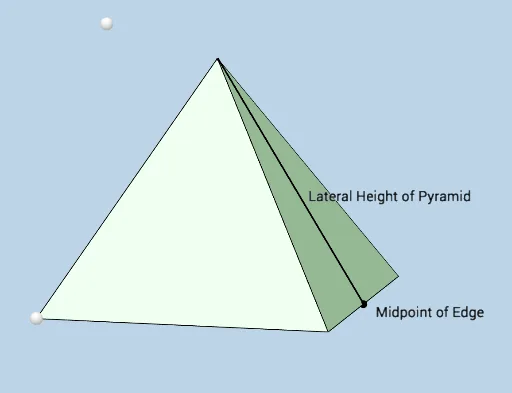
① This GeoGebra example dynamically illustrates the internal anatomy of a square pyramid, including the square base, four lateral edges, four triangular faces, and auxiliary internal lines, helping learners intuitively grasp the geometric composition of a pyramid. ② Core mathematical concepts involve solid geometry (pyramids, square base, triangular faces, edges, vertices) and plane geometry (midpoints, perpendicular lines, angles, congruent triangles, Pythagorean relations), with extensions to tangent functions and parabolas. ③ Construction highlights: from the construction summary, commands such as Intersect, Point/PointIn, Pyramid, Ray, Segment, Midpoint, Polygon, Angle, and OrthogonalLine are used, creating multiple face objects (e.g., faceACBD, faceADF) and edge objects (e.g., edgeAD, edgeAC) for dynamic adjustment. ④ Suitable for high school or early college students learning solid geometry, this serves as a classroom demonstration or self-exploration tool, allowing users to drag vertices to observe shape changes and understand relationships among edges, faces, and angles.
GeoGebra Commands & Parameters
Intersect(yAxis, xAxis) → DPoint(zAxis) → EPointIn(c) → FPyramid(D, A, C, B, F) → b, faceACBD_1, edgeDF, edgeAF, edgeCF, edgeBF, faceADF, faceACF, faceBCF, faceBDF, edgeAD_1, edgeAC_1, edgeBC_1, edgeBD_1Ray(G, H) → fPoint(f) → IPoint(edgeCF) → JIntersect(c, f) → KPyramid(A, C, B, D, K) → d, faceACBD, edgeAK, edgeCK, edgeBK, edgeDK, faceACK, faceBCK, faceBDK, faceADK, edgeAC, edgeBC, edgeBD, edgeADSegment(G, K) → hMidpoint(edgeBC) → MSegment(G, M) → jSegment(M, K) → kPolygon(G, M, K) → poly1, k_1, g, mAngle(M, G, K) → αOrthogonalLine(F, e) → iIntersect(i, e) → LSegment(F, L) → lAngle(F, L, A) → βPolygon(K, G, M) → poly2, m_1, k_2, g_1
AI Drawing Prompt Reference
Draw a dynamically adjustable square pyramid anatomy diagram. Start with a square base, place an apex above it, and connect the apex to the four base corners to form four lateral edges and four triangular faces. Inside the base, add an auxiliary ray intersecting a base edge, and place a point on this ray to construct an internal triangular cross-section. From the base center, draw a segment to the midpoint of one lateral edge, then connect that midpoint to the cross-section vertex, forming an auxiliary triangle. Mark the angle at the base center and the angle at the cross-section vertex. The overall figure shows the pyramid's internal structure, including the base, lateral edges, faces, auxiliary lines, and angle labels, for observing geometric relationships.
The prompt above was compiled from the original drawing commands and is for reference only.