
One Quarter of the Cross: Square Rotation and Area Relationship
Loading the math board and drawing, please wait…
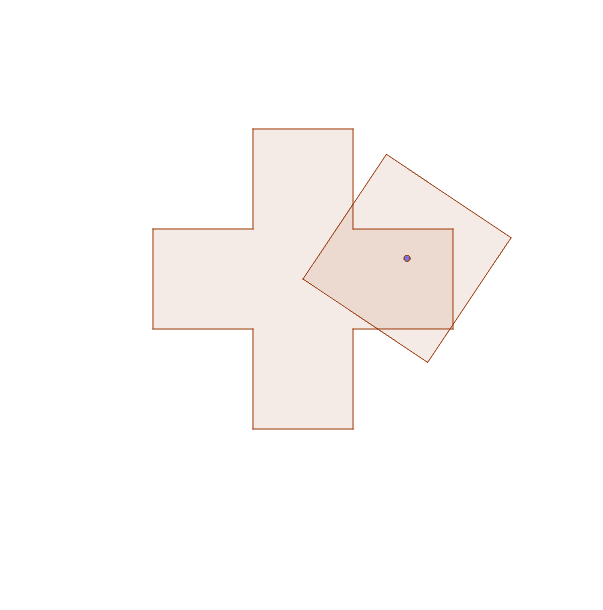
This GeoGebra worksheet demonstrates a square rotating around the center of a cross-shaped figure, allowing students to observe changes in the overlapping region and generalize the area relationship, especially the one-quarter fraction. Core mathematical concepts include fractions, plane geometry, rotational symmetry, area relationships, and geometric generalization. The construction relies on GeoGebra commands such as Polygon to build the square and cross, Line and LineBisector for straight lines and angle bisectors, Intersect to locate intersection points, Circle for auxiliary circles, and Point to define objects A through R along with polygon poly1 and related lines. It is suitable for middle school and high school geometry and fractions instruction, ideal for classroom inquiry, hands-on construction, and area relationship generalization activities.
GeoGebra Commands & Parameters
Polygon(G, F, I, J, E, D, C, B, N, M, L, K) → poly1, g, k, i, j, f, e, d, c, b, n, m, lLine(E, D) → aLine(N, B) → hIntersect(a, h) → OLine(C, O) → pLineBisector(A, O) → qIntersect(p, q) → PCircle(A, P) → rPoint(r) → QCircle(Q, A) → sLine(A, Q) → tIntersect(s, t, 2) → RLineBisector(A, R) → a_1Intersect(s, a_1, 2) → SIntersect(s, a_1, 1) → TPolygon(A, S, R, T) → poly2, a_2, s_1, r_1, t_1
AI Drawing Prompt Reference
Draw a cross-shaped figure and a rotating square. The cross is made of two perpendicular lines and two horizontal lines intersecting at the center. The square rotates around the center of the cross, allowing observation of the overlapping region. Key objects include the center point of the cross, the vertices of the square, and the overlapping area. The construction order is to draw the cross first, then the square, then rotate the square and mark the overlapping part.
The prompt above was compiled from the original drawing commands and is for reference only.