
Octagon Folding Demonstration
Loading the math board and drawing, please wait…
In collections
Folding paper, doing geometry figures
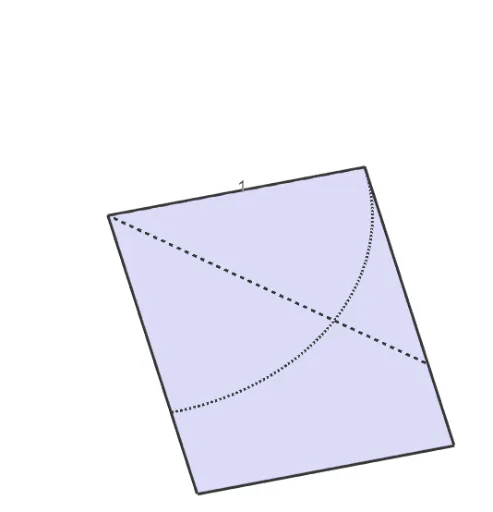
This example demonstrates the dynamic process of folding an octagon through geometric transformations. Key math concepts include polygon construction, vector operations, and transformations such as rotation, reflection, and translation. GeoGebra commands like Polygon, Segment, Vector, If, Translate, CircleArc, Mirror, Rotate, and Midpoint are utilized in the construction. Suitable for high school geometry transformation lessons and exploratory learning.
GeoGebra Commands & Parameters
Polygon(A, C, D, B) → vierhoek1, a, c, d, bSegment(DD, E) → fVector((0, -0.15)) → uPolygon(B, DD, E, D) → vierhoek2, b_1, dd, e, d_1Polygon(A, C, E, DD) → vierhoek3, a_1, c_1, e_1, dd_1If(s < 1, vierhoek3, If[1 < s ≤ 2, Polygon[Translate[A, Vector[((s - 1) * u)]], Translate[C, Vector[((s - 1) * u)]], Translate[E, Vector[((s - 1) * u)]], Translate[DD, Vector[((s - 1) * u)]]], Polygon[Translate[A, u], Translate[C, u], Translate[E, u], Translate[DD, u]]]) → vierhoek4Vector(D, B) → vTranslate(afbeelding1, Vector[(1.25 * ((s - 1) * v))]) → afbeelding1'Segment(B, E) → gCircleArc(B, DD, D) → hSegment(DD, D) → iPolygon(A2, A1, D1, D2) → vierhoek5, a2, a1, d1, d2Mirror(D, d1) → DBMirror(DD, a2) → DDBCircleArc(D2, DB, D) → kCircleArc(A2, DD, DDB) → pPolygon(B, A2, A1, E, D1, D2) → veelhoek1, b_2, a2_1, a1_1, e_2, d1_1, d2_1Polygon(D1, D, D2) → driehoek1, d2_2, d1_2, d_2Rotate(D1, (((-(s - 3)) * 180))°, d1) → D1'Rotate(D, (((-(s - 3)) * 180))°, d1) → D'Rotate(D2, (((-(s - 3)) * 180))°, d1) → D2'Polygon(D1', D', D2') → driehoek1', d2', d1', d'Polygon(D2, DB, D1) → driehoek2, d1_3, d2_3, dbMidpoint(B, E) → MRotate(D2, 180°, M) → D2'_1Rotate(DB, 180°, M) → DB'Rotate(D1, 180°, M) → D1'_1Polygon(D2'_1, DB', D1'_1) → driehoek2', d1'_1, d2'_1, db'Polygon(B, B1, B2) → driehoek4, b2, b_3, b1Polygon(A2, DD, A1) → driehoek3, a1_2, a2_2, dd_2Rotate(A2, (((-(s - 3)) * 180))°, a2) → A2'Rotate(DD, (((-(s - 3)) * 180))°, a2) → DD'Rotate(A1, (((-(s - 3)) * 180))°, a2) → A1'Polygon(A2', DD', A1') → driehoek3', a1', a2', dd'Polygon(B2, B1, A2, A1, C1, C2, D1, D2) → veelhoek2, b2_1, b1_1, a2_3, a1_3, c1, c2, d1_4, d2_4Polygon(B1, C1, C2, B2) → vierhoek6, b1_2, c1_1, c2_1, b2_2Segment(DDB, DB) → jRotate(B, (((s - 5) * 180))°, b_3) → B'Rotate(B1, (((s - 5) * 180))°, b_3) → B1'Rotate(B2, (((s - 5) * 180))°, b_3) → B2'Polygon(B', B1', B2') → driehoek4', b2', b', b1'Polygon(B2, B1, A2, A1, C1, C2, D1, D2) → veelhoek3, b2_3, b1_3, a2_4, a1_4, c1_2, c2_2, d1_5, d2_5Rotate(C1, (((-(s - 5)) * 180))°, c1) → C1'Rotate(E, (((-(s - 5)) * 180))°, c1) → E'Rotate(C2, (((-(s - 5)) * 180))°, c1) → C2'Polygon(C1', E', C2') → driehoek5', c2', c1', e'Rotate(DDB, 90°, M) → DDB'Rotate(DB, 90°, M) → DB'_1Segment(DDB', DB'_1) → j'Polygon(B1, DB'_1, B2) → driehoek5, b2_4, b1_4, db'_1Polygon(C1, DDB', C2) → driehoek6, c2_3, c1_3, ddb'Rotate(B1, (((-(s - 6)) * 45))°, M) → B1'_1Rotate(C1, (((-(s - 6)) * 45))°, M) → C1'_1Rotate(C2, (((-(s - 6)) * 45))°, M) → C2'_1Rotate(B2, (((-(s - 6)) * 45))°, M) → B2'_1Polygon(B1'_1, C1'_1, C2'_1, B2'_1) → vierhoek6', b1'_1, c1'_1, c2'_1, b2'_1Mirror(B2, M) → E1Mirror(B1, M) → E2Mirror(B, b2_2) → BBMirror(BB, M) → EECircleArc(B1, BB, B) → qCircleArc(C1, E, EE) → r
AI Drawing Prompt Reference
Draw an octagon and demonstrate its folding process through geometric transformations such as rotation, translation, and reflection. Start by constructing the octagon, then create vectors and segments. Next, use translation and rotation to transform the vertices of the octagon. Finally, apply reflection and circular arcs to further transform the vertices, showcasing the folding process.
The prompt above was compiled from the original drawing commands and is for reference only.