
Obtaining Fractions via Folding Paper
Loading the math board and drawing, please wait…
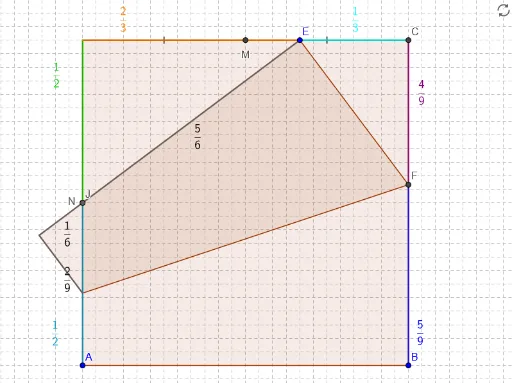
① This example demonstrates how to obtain fractions (e.g., 1/2, 1/3) by folding a square paper, with fold lines and resulting segment lengths displayed as fraction text. ② Core mathematical concepts include fractions, midpoints, angle bisectors, reflection symmetry, and set-theoretic boundary division, linking geometric construction with algebraic representation. ③ Construction highlights: using GeoGebra commands such as Polygon to create the square, Mirror for folding symmetry, LineBisector for angle bisectors, Intersect for intersection points, Segment for fold lines, Midpoint for midpoints, and FractionText to display ratios as fractions; key objects include vertices A, B, C, D, the fold line, auxiliary points (B', E, F, H, etc.), and text labels. ④ Suitable for middle and high school students, this serves as a hands-on math experiment to explore the relationship between fractions and geometric folding, fostering intuitive understanding and abstract reasoning.
GeoGebra Commands & Parameters
Polygon(A, B, 4) → square, AB, BC, CD, DA, C, DMirror(B, CD) → B'Mirror(B, DA) → B'_1Mirror(B, D) → B'_2Polygon(B, B', B'_2, B'_1) → boundary, b_1, b', b'_2, b'_1PointIn(boundary) → ELineBisector(E, B) → jIntersect(j, BC) → FIntersect(j, DA) → HMirror(A, j) → A'If(FH, Intersect[DA, Segment[E, A']]) → JSegment(A, J) → JAIntersect(j, AB) → GIntersect(j, CD) → IMirror(C, j) → C'If(FG, Polygon[E, F, G], FH, Polygon[E, F, H, A'], GI, Polygon[E, C', I, G], HI, Polygon[E, C', I, H, A']) → foldMidpoint(C, D) → MSegment(D, M) → DMSegment(M, C) → MCSegment(D, J) → DJFractionText(1 - left) → text2FractionText(left) → textAMidpoint(A, D) → NSegment(C, E) → CESegment(D, E) → DEFractionText(top) → textBFractionText(1 - top) → text1Segment(C, F) → CFSegment(F, B) → FBFractionText(right) → textCFractionText(1 - right) → text3Segment(E, J) → EJSegment(J, A') → JA'Segment(A', H) → HA'Segment(E, A') → EA'FractionText(flip) → textDFractionText(1 - flip) → text4FractionText(flip2) → textE
AI Drawing Prompt Reference
Draw a square paper and show fractions by folding. Start with a square, then create a fold line passing through an interior point, intersecting two opposite sides. Reflect some vertices across this line to show symmetry. Connect intersection points and reflected points to form the folded region. Mark midpoints on sides and draw segments between key points. Display fraction labels (like 1/2, 1/3) next to corresponding segments to indicate their lengths relative to the square's side. The final image shows the square, fold line, folded area, auxiliary segments, and fraction texts.
The prompt above was compiled from the original drawing commands and is for reference only.