
Equilateral triangles on a triangle
Loading the math board and drawing, please wait…
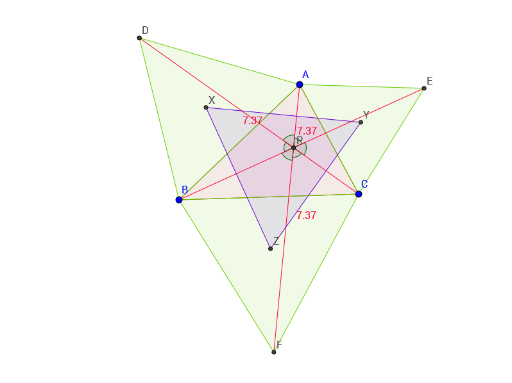
This example demonstrates the process of constructing equilateral triangles inside and outside any given triangle, highlighting geometric properties and constructions. Key math concepts include equilateral triangle construction, angle bisectors, circle-line segment intersections, and polygon drawing. GeoGebra commands used in the construction are Polygon, Circle, Intersect, Segment, Angle, and LineBisector. Suitable for high school geometry instruction, it aids in understanding the symmetry and construction methods of equilateral triangles.
GeoGebra Commands & Parameters
Polygon(A, B, C) → poly1, c, a, bCircle(A, B) → dCircle(B, A) → eCircle(C, A) → fCircle(A, C) → gIntersect(d, e, 2) → DIntersect(f, g, 2) → ECircle(C, B) → hCircle(B, C) → kIntersect(h, k, 1) → FPolygon(A, B, D) → poly2, d_1, a_1, b_1Polygon(A, E, C) → poly3, c_1, a_2, e_1Polygon(C, F, B) → poly4, b_2, c_2, f_1Segment(E, B) → iSegment(D, C) → jSegment(F, A) → lIntersect(b_1, j) → GIntersect(i, j) → PAngle(E, P, A) → αAngle(A, P, D) → βAngle(D, P, B) → γAngle(B, P, F) → δAngle(F, P, C) → εAngle(C, P, E) → ζLineBisector(c) → mLineBisector(a_1) → nLineBisector(b_1) → pLineBisector(c_1) → qLineBisector(a_2) → rLineBisector(b) → sLineBisector(a) → tLineBisector(c_2) → g_1LineBisector(b_2) → h_1Intersect(m, n) → XIntersect(q, r) → YIntersect(t, g_1) → ZPolygon(X, Y, Z) → poly5, z_1, H, I