
Napoleon Equilateral Triangles
Loading the math board and drawing, please wait…
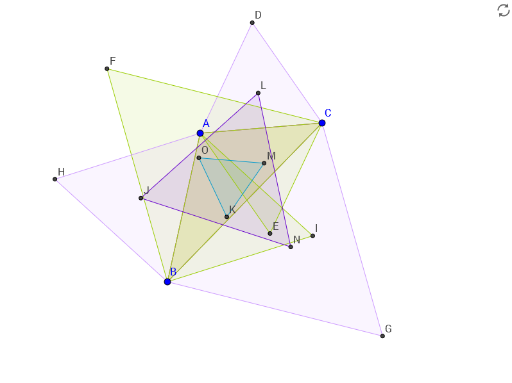
This example demonstrates the construction of Napoleon equilateral triangles. It involves equilateral triangles, triangle properties, and intersection points. Using GeoGebra commands such as Polygon, Circle, and Intersect, a series of equilateral triangles can be constructed. Suitable for students at the junior high school level and above for geometric construction.
GeoGebra Commands & Parameters
Polygon(A, B, C) → poly1, c, a, bCircle(A, C) → dCircle(C, A) → eIntersect(d, e, 1) → DIntersect(d, e, 2) → ECircle(B, C) → fCircle(C, B) → gIntersect(f, g, 1) → FIntersect(f, g, 2) → GPolygon(C, A, D) → poly2, d_1, c_1, a_1Polygon(B, C, G) → poly3, g_1, b_1, c_2Polygon(A, C, E) → poly4, e_1, a_2, c_3Polygon(B, C, F) → poly5, f_1, b_2, c_4Circle(B, A) → hCircle(A, B) → kIntersect(h, k, 1) → HIntersect(h, k, 2) → IPolygon(A, B, H) → poly6, h_1, a_3, b_3Polygon(A, B, I) → poly7, i, a_4, b_4LineBisector(c) → jLineBisector(a_3) → lLineBisector(b_3) → mIntersect(j, l) → JLineBisector(b_4) → nLineBisector(a_4) → pIntersect(j, n) → KLineBisector(b) → qLineBisector(c_1) → rLineBisector(a_1) → sIntersect(q, r) → LLineBisector(c_3) → tLineBisector(a_2) → i_1Intersect(q, t) → MLineBisector(a) → j_1LineBisector(c_2) → k_1LineBisector(b_1) → l_1Intersect(j_1, k_1) → NLineBisector(c_4) → m_1LineBisector(b_2) → n_1Intersect(j_1, m_1) → OPolygon(J, L, N) → poly8, n_2, j_2, l_2Polygon(O, M, K) → poly9, k_2, o, m_2
AI Drawing Prompt Reference
Draw a triangle ABC, then construct equilateral triangles on each side with the opposite vertex as the apex, resulting in points D, E, F, G, H, and I. Next, draw the circumcircles of these equilateral triangles and find their intersections to get points J, K, L, M, N, and O. Finally, connect these intersection points to form new triangles, such as JLN and OMK.
The prompt above was compiled from the original drawing commands and is for reference only.