
Newton–Gauss Line in a Triangle: A Construction for Collinearity
Loading the math board and drawing, please wait…
In collections
Besondere Punkte/Special Points
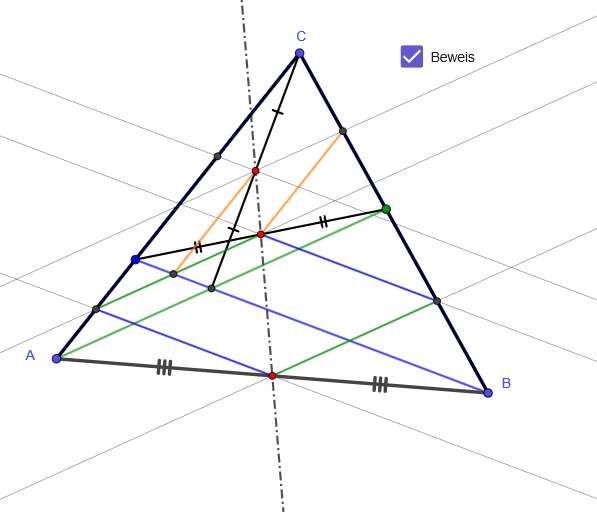
This GeoGebra example demonstrates how a specific sequence of constructions in a given triangle leads to the collinearity phenomenon known as the Newton–Gauss line. It focuses on identifying the relevant points created from midpoints and line intersections, then visually verifying that they lie on a single straight line. The core concepts include triangle geometry, constructing lines from segments, computing midpoints, and using intersections to assemble the configuration whose conclusion is collinearity; the underlying motivation is tied to quadratic-function geometry (how quadratic structures manifest as geometric line relations). Construction workflow: Polygon builds the triangle from points A, B, and C; Midpoint determines key points (D, E, F, etc.); Point creates additional critical points used in the setup; Segment connects constructed parts; Line defines candidate lines; and Intersect computes the intersection points used to test the Newton–Gauss line. Suitable for upper-secondary geometry exploration and early undergraduate analytic/synthetic geometry lessons, especially for students learning how theorem statements about collinearity can be confirmed through dynamic geometric construction.
GeoGebra Commands & Parameters
Polygon(A, B, C) → d1, c, a, bMidpoint(c) → DPoint(a) → EPoint(b) → FSegment(F, B) → fSegment(A, E) → gSegment(F, E) → hIntersect(f, g) → GSegment(G, C) → iMidpoint(i) → HMidpoint(h) → ILine(D, H) → jSegment(A, D) → kSegment(D, B) → lSegment(F, I) → mSegment(I, E) → nSegment(G, H) → pSegment(H, C) → qLine(D, g) → rIntersect(r, a) → JSegment(D, J) → sLine(D, f) → tIntersect(t, b) → KSegment(D, K) → eLine(K, g) → f_1Line(J, f) → g_1Segment(K, I) → h_1Segment(J, I) → i_1Line(H, f_1) → j_1Line(H, f) → k_1Intersect(j_1, a) → LIntersect(k_1, b) → MSegment(I, L) → l_1Intersect(f_1, f) → NSegment(N, H) → m_1
AI Drawing Prompt Reference
Draw an arbitrary triangle. Mark the midpoint of one sidecars. Choose a point on each of the other two sides. Connect these two points to their opposite vertices, and find the intersection of those two segments. Connect that intersection to the third vertex)Skip. Take the midpoints of this new segment and of the segment joining the two side-points. Draw a line through these two midpoints. Then, from the first midpoint, draw lines to each side-point, extending them to meet the opposite sides, creating two new points. Connect these new points to the relevant midpoints, and draw additional auxiliary lines to show that all key points lie on a single straight line.
The prompt above was compiled from the original drawing commands and is for reference only.