
Geogebra Geometry Construction Example by JM Arranz, JA Mora, M Sada y R Losada
Loading the math board and drawing, please wait…
In collections
geometriadinamica.es
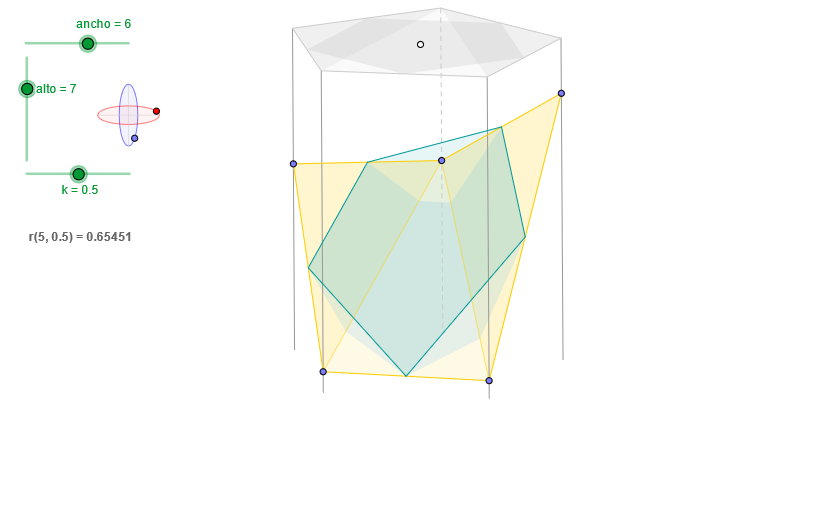
This example demonstrates dynamic geometric construction and visualization using GeoGebra, involving core math concepts like perimeter, vectors, exponential functions, correlation, and similar triangles. Key GeoGebra commands and objects used in the construction include OrthogonalLine, Circle, Intersect, Ellipse, Point, Angle, Translate, Vector, Sequence, Element, Segment, Polygon, Midpoint, and Line. Suitable for high school and above mathematics learners for understanding geometric constructions and dynamic demonstrations.
GeoGebra Commands & Parameters
OrthogonalLine(C, xAxis) → z2Circle(C, 0.62) → z0Intersect(z0, z2, 1) → Z4Intersect(z0, z2, 2) → Z3Ellipse(Z3, Z4, 0.65) → zElipse2Point(zElipse2) → ZIntersect(zElipse2, z2) → Z7, Z8Angle(Z8, C, Z) → zAngIncOrthogonalLine(C, yAxis) → z1Intersect(z0, z1, 2) → Z2Intersect(z0, z1, 1) → Z1Ellipse(Z1, Z2, 0.65) → zElipse1Point(zElipse1) → XYTranslate((0, 0), v) → OOrthogonalLine(O, yAxis) → dPoint(d) → GVector((0, 0), G) → wSequence(PuntoEsfera[C, XY, Z, radio, 0, (s * α)], s, 0, n) → puntosASequence((x(w) + x(Element[puntosA, s]), y(w) + y(Element[puntosA, s])), s, 1, n + 1) → puntosBSequence(Segment[Element[puntosB, s], Element[puntosA, s]], s, 1, n) → aristasElement(aristas, 5) → a5Point(a5) → JElement(aristas, 1) → a1Point(a1) → AElement(aristas, 2) → a2Point(a2) → BElement(aristas, 3) → a3Point(a3) → DElement(aristas, 4) → a4Point(a4) → EElement(puntosB, 5) → B5Element(puntosB, 1) → B1Element(puntosB, 2) → B2Element(puntosB, 3) → B3Element(puntosB, 4) → B4Intersect(zElipse1, z1) → Z5, Z6Segment(Z5, Z6) → z4Segment(Z7, Z8) → z3Intersect(zElipse2, zElipse1, 1) → zPunto1Intersect(zElipse2, zElipse1, 4) → zPunto2Polygon(B1, B2, B3, B4, B5) → poly2, a, b, c, e, fSegment(zPunto1, zPunto2) → zSeg2Angle(Z6, C, XY) → zAngRotSequence(Angle[Element[puntosB, s + 1], Element[puntosB, s], Element[puntosA, s + 1]], s, 1, n) → angulosSequence(If[s > 1 ∧ Element[angulos, s - 1] > 180° ∧ Element[angulos, s] > 180°, false, If[s ≟ 1 ∧ Element[angulos, n] > 180° ∧ Element[angulos, s] > 180°, false, true]], s, 1, n) → aristasVisiblesElement(aristas, 1) → a1bPolygon(A, B, D, E, J) → poly1, g, h, i, j, k_2Element(aristas, 2) → a2bElement(aristas, 3) → a3bSequence(If[Element[angulos, s] > 180°, false, true], s, 1, n) → carasVisiblesAngle(B1, B2, B3) → βElement(aristas, 4) → a4bPolygon(A, D, B) → poly3, b_1, a_1, d_1Midpoint(A, D) → IAngle(H, I, F) → γElement(aristas, 5) → a5bPolygon(J, A, E) → poly6, e_1, j_1, a_3Midpoint(B1, B4) → MLine(M, a5) → lIntersect(j_1, l) → NAngle(L, N, F) → δVector(B1, B5) → zVector(B5, B4) → mVector(B4, B3) → pVector(B3, B2) → qVector(B2, B1) → rLine(P, a5) → sLine(Q, a5) → tLine(R, a5) → c_1Line(S, a5) → f_1Line(T, a5) → g_1Intersect(k_2, s) → UIntersect(j, t) → VIntersect(i, c_1) → WIntersect(h, f_1) → A_1Intersect(g, g_1) → B_1Polygon(Q, R, S, T, P) → poly4, q_1, r_1, s_1, t_1, p_1Polygon(B5, B4, B1) → poly5, b1, b5, b4Intersect(t_1, b5) → C_1Intersect(q_1, b5) → D_1Polygon(B1, B3, B2) → poly7, b2, b1_1, b3Intersect(t_1, b2) → E_1Intersect(r_1, b2) → F_1Line(C_1, a5) → h_1Line(D_1, a5) → i_1Line(E_1, a5) → k_1Line(F_1, a5) → l_1Intersect(j_1, i_1) → G_1Intersect(j_1, h_1) → H_1Intersect(b_1, k_1) → I_1Intersect(b_1, l_1) → J_1Polygon(H_1, U, V, G_1) → poly8, h_2, u_1, v_1, g_2Polygon(G_1, W, J_1, I_1, H_1) → poly9, g_3, w_1, j_2, i_2, h_3Polygon(J_1, A_1, B_1, I_1) → poly10, j_3, a_2, b_2, i_3Polygon(U, B_1, A_1, W, V) → poly11, u_2, b_3, a_4, w_2, v_2
AI Drawing Prompt Reference
Draw a coordinate plane with a point C as the center and two perpendicular axes. Construct a circle centered at C with a given radius, and obtain intersection points with the directions determined by the perpendicular lines to the axes. Use these points to define two ellipses that share the same shape parameter (one built from a pair of intersections on the same vertical reference, and another from a different pair). Take key points from each ellipse and compute two ellipse–ellipse intersection points to form a segment between them. Mark an angle at the center involving the intersection on one ellipse and a reference point on the horizontal base. Then define a translation direction from the origin to a selected point and use it with a parameter step to generate two sequences of points along the construction’s shifting pattern. Connect corresponding points from the two sequences to form edges, pick several specific points from these edges, and finally draw two polygons: one from the selected outer points and another involving the center-related point set, using the earlier ellipse intersection segment as part of the structure.
The prompt above was compiled from the original drawing commands and is for reference only.