
New Trig IDs From Similar Right Triangles
Loading the math board and drawing, please wait…
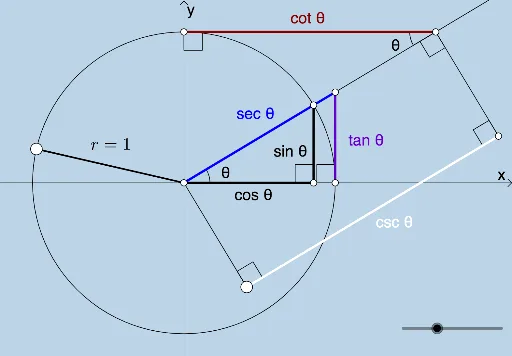
This example demonstrates how to derive new trigonometric identities using similar right triangles. Key math concepts include similarity, trigonometric definitions, and angle relationships. GeoGebra commands/objects used are Intersect, Circle, Rotate, Ray, OrthogonalLine, Line, Angle, Segment, and Point. Suitable for high school students learning trigonometry and geometry.
GeoGebra Commands & Parameters
Intersect(xAxis, yAxis) → ACircle(A, 1) → cIntersect(c, b) → E, FRotate(F, (o * π / 180), A) → BRay(A, B) → aOrthogonalLine(B, b) → dIntersect(b, d) → CIntersect(b, xAxis) → DLine(F, d) → eAngle(b, a) → θSegment(A, B) → fAngle(B, C, A) → αSegment(A, C) → gSegment(C, B) → hIntersect(e, a) → GSegment(F, G) → iAngle(G, F, A) → βLine(G, b) → jSegment(A, G) → lPoint(c) → HSegment(A, H) → radiusOrthogonalLine(I, e) → mIntersect(m, a) → JSegment(I, J) → nAngle(J, I, A) → γAngle(I, J, A) → δOrthogonalLine(J, a) → pLine(A, p) → qPoint(q) → LOrthogonalLine(L, q) → sIntersect(p, s) → MSegment(L, M) → tAngle(J, M, L) → εAngle(M, L, A) → ζAngle(A, J, M) → ηSegment(J, M) → rSegment(A, L) → f_1