
Net of a Cone by Anthony OR 柯志明
Loading the math board and drawing, please wait…
In collections
Area, Surface Area, Volume, Cross Section, 3D
3D Geometry & Cross Sections
Surface Area and Volume
Geometry: Surface Area & Volume
Geometry: Surface Area & Volume
Geometry: Surface Area & Volume
GA Chapter 11: Surface Area and Volume
Nets of 3D Figures 立體圖形的摺紙圖樣
Nets of Solids
Parametric Surfaces
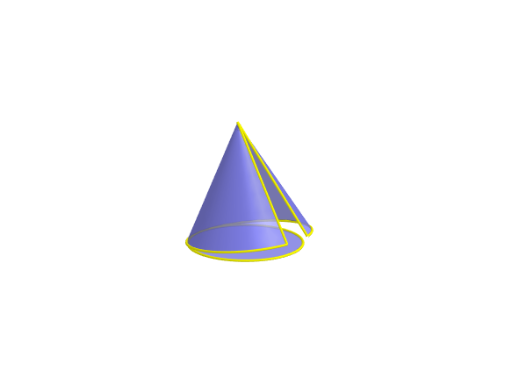
This example demonstrates the net of a cone, illustrating how a three-dimensional cone unfolds into a two-dimensional sector. It involves core mathematical concepts such as solid geometry, angles, circles, functions, and transformations. The construction utilizes GeoGebra commands/objects like OrthogonalLine, Circle, Point, Intersect, Cone, Segment, Distance, Angle, Rotate, CircumcircleArc, Surface, and CurveCartesian. It is suitable for high school and above students learning about geometric properties and calculations related to cones.
GeoGebra Commands & Parameters
OrthogonalLine((1, 0, 0), xOyPlane) → aCircle(a, (0, 0, 0)) → cPoint(a) → AIntersect(xAxis, a) → BCone(B, A, 1) → b, d, eIntersect(yAxis, xAxis) → CSegment(C, A) → lDistance(B, C) → rAngle(A, C, B) → αRotate(A, (t * α), yAxis) → A'OrthogonalLine(A', xOyPlane) → fIntersect(f, xOyPlane) → B'Rotate(C, β / 2, f) → C'Rotate(C, ((-β)) / 2, f) → C'_1CircumcircleArc(C', C, C'_1) → gDistance(A', B') → hDistance(B', C') → r'Surface(((k - ((v * r') * cos((u * β / 2)))) * cos(ϕ)) - (((1 - v) * h) * sin(ϕ)), ((v * r') * sin((u * β / 2))), (((1 - v) * h) * cos(ϕ)) + ((k - ((v * r') * cos((u * β / 2)))) * sin(ϕ)), u, -1, 1, v, 0, 1) → jCurveCartesian(((k - (r' * cos((u * β / 2)))) * cos(ϕ)), (r' * sin((u * β / 2))), ((k - (r' * cos((u * β / 2)))) * sin(ϕ)), u, -1, 1) → mSegment(E, F) → nSegment(D, F) → p
AI Drawing Prompt Reference
Draw the net of a cone. First, create a cone. Then, unfold it into a sector. The sector's angle relates to the cone's slant height. Ensure the sector matches the cone's lateral surface. Construct by determining the cone's vertex, base circle, and slant line. Then calculate the sector's dimensions. Finally, compare the sector with the cone's lateral surface to verify correctness.
The prompt above was compiled from the original drawing commands and is for reference only.