
CAST Rule Demonstration
Loading the math board and drawing, please wait…
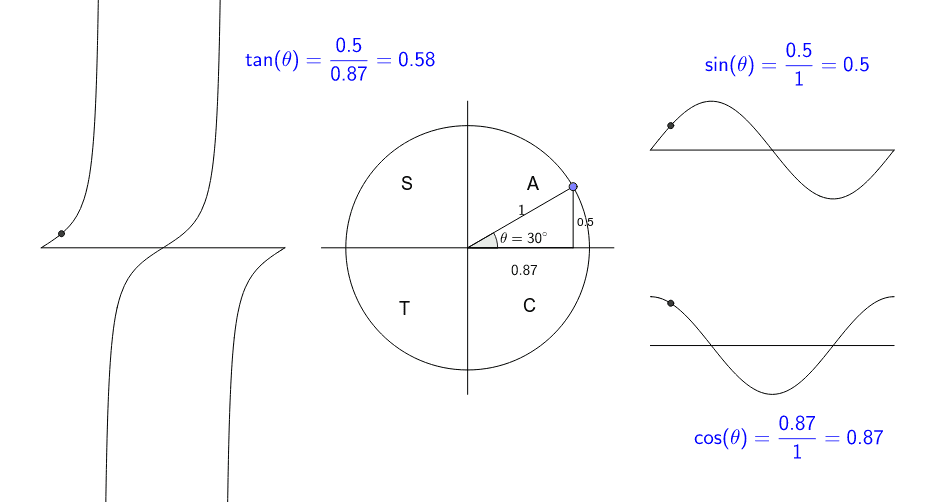
This example dynamically illustrates the CAST rule in trigonometry using GeoGebra, visually demonstrating the sign changes of sine, cosine, and tangent functions on the unit circle across quadrants. It covers core concepts like trigonometric functions, unit circle, quadrants, and sign rules. The construction leverages commands such as Intersect, Circle, Point, Segment, Angle, and If for interactive visualization and conditional text display. Suitable for high school students and teachers to understand trigonometric sign variations and unit circle applications, or as a supplementary tool for teaching trigonometric continuity in calculus.
GeoGebra Commands & Parameters
Intersect(xAxis, yAxis) → ACircle(A, (1, 0)) → cPoint(c) → BSegment(A, B) → aPoint(c) → CAngle(C, A, B) → ThetaSegment(B, D) → bSegment(D, A) → dIf(1.5 < x < 3.5, 0.4 * sin((180 * (x - 1.5))°) + 0.8) → fPoint(f) → EPoint(f) → GPoint(f) → HSegment(F, I) → gIf(-3.5 < x < -1.5, 0.2 * tan((180 * (x + 1.5))°)) → pPoint(p) → JSegment(K, L) → iIntersect(f, e, (1.6667931860945413, 1.000137672712641)) → MIf(1.5 < x < 3.5, 0.4 * cos((180 * (x - 1.5))°) - 0.8) → hIntersect(h, e, (1.6667931860945413, -0.45366936034885996)) → NIntersect(p, q, (-3.3332068139054587, 0.1155760708404203)) → OSegment(P, Q) → jSegment(R, S) → kSegment(T, U) → l