
Tangents to Circles Construction
Loading the math board and drawing, please wait…
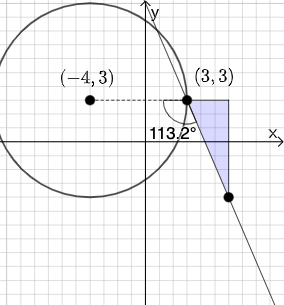
This example demonstrates the construction of tangent lines to circles using GeoGebra, involving core concepts like circles, tangent lines, angles, and slopes. It utilizes commands such as PointIn, Line, Polygon, Segment, Slope, Textfield, Mode, If, Circle, and Angle for precise geometric constructions. Suitable for high school mathematics education to help students understand the properties and methods of constructing tangent lines.
GeoGebra Commands & Parameters
PointIn(e) → APointIn(e) → BPointIn(e) → DLine(A, B) → fPolygon(A, C, B) → t1, b_1, a_1, c_1Segment(B, C) → gSegment(C, A) → hSlope(f) → iTextfield(k) → InputBox2Textfield(j) → InputBox1Mode(l1) → l2If(Length[l2] ≟ 0, "You have no repeated digits!", "You have repeated digits.") → text5Circle(D, A) → pSegment(D, A) → qAngle(B, A, D) → αIf(α ≟ pi / 2, "Line is tangent to circle.", "Line is not tangent to circle.") → text1Textfield(s) → InputBox3Textfield(t) → InputBox4If(j / k ≟ i, "√", "X") → text6If(Slope[q] ≟ s / t, "√", "X") → text7
AI Drawing Prompt Reference
Draw a circle and a tangent line. The line touches the circle at point A. Points A and D are on the circle, and the line passes through A and B. Construct the circle first, then the line, and verify if the line is tangent to the circle.
The prompt above was compiled from the original drawing commands and is for reference only.