
Net Flow with Angle
Loading the math board and drawing, please wait…
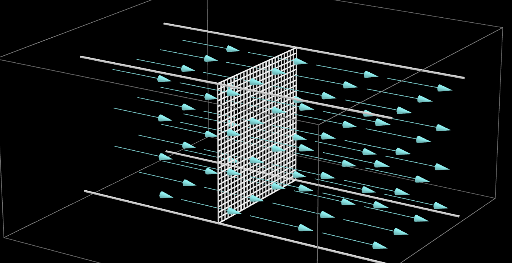
This example demonstrates the flow of fluid through a surface, visualizing dynamic processes with angle variations. Core math concepts include calculus, vector fields, geometric transformations, and polygon construction. GeoGebra commands and objects used are CurveCartesian, Sphere, PointIn, OrthogonalLine, Rotate, Line, Point, Vector, Circle, Intersect, Polygon, OrthogonalPlane, Angle, Segment, Sequence, Element, If, Prism, Translate. Suitable for high school and above, ideal for teaching fluid dynamics, spatial geometry, and computational geometry.
GeoGebra Commands & Parameters
CurveCartesian((2 * t) - 4, 0, 0, t, 0, 10) → PathlineSphere(FluidPt_2, 1) → a_1PointIn(a_1) → S_4PointIn(a_1) → S_5PointIn(a_1) → S_2PointIn(a_1) → S_1PointIn(a_1) → S_6PointIn(a_1) → S_7PointIn(a_1) → S_3OrthogonalLine(A, xOyPlane) → i_1Rotate(B, (-angle), A) → B'Line(A, B') → bOrthogonalLine(B', b, xOyPlane) → dPoint(d) → G_1Vector(B', G_1) → v_1Circle(A, 2, normalvectorplane) → s_1Intersect(xOyPlane, s_1) → J_1, K_1Line(K_1, J_1) → a_2OrthogonalLine(J_1, xOyPlane) → t_1OrthogonalLine(K_1, xOyPlane) → j_1Intersect(i_1, s_1) → H_1, I_1Line(I_1, a_2) → c_2Intersect(j_1, c_2) → Cuadro3Intersect(t_1, c_2) → Cuadro4Line(H_1, a_2) → b_2Intersect(b_2, t_1) → Cuadro2Intersect(b_2, j_1) → Cuadro1Polygon(Cuadro3, Cuadro4, Cuadro2, Cuadro1) → poly3, o_2, n_2, m_2, l_2OrthogonalPlane(B', d) → eOrthogonalPlane(FluidPt, yAxis) → mOrthogonalLine(FluidPt, xOyPlane) → lPoint(l) → FOrthogonalLine(F, m) → rOrthogonalLine(FluidPt, xAxis, xOyPlane) → hPoint(h) → EOrthogonalLine(E, xOyPlane) → qIntersect(r, q) → KLine(E, xAxis) → iLine(K, i) → Container3Intersect(Container3, e) → PCircle(FluidPt, E, xOyPlane) → kIntersect(h, k) → H, JOrthogonalLine(H, xOyPlane) → nIntersect(r, n) → LLine(H, xAxis) → jLine(L, j) → Container4Intersect(Container4, e) → OCircle(h, F) → pIntersect(l, p) → G, ILine(I, h) → sIntersect(s, q) → NLine(N, i) → Container2Intersect(Container2, e) → QIntersect(s, n) → MLine(M, j) → Container1Intersect(Container1, e) → RIntersect(xAxis, yAxis) → ZVector(D_1, Z) → u_1OrthogonalLine(A, xAxis, xOyPlane) → aAngle(B', A, B, xOyPlane) → θOrthogonalPlane(A, xAxis) → cSegment(A, B') → gPoint(h) → DPolygon(L, K, N, M) → poly1, l_1, k_1, n_1, m_1Segment(O, P) → d_1Segment(P, Q) → e_1Segment(R, Q) → f_1Segment(R, O) → g_1PointIn(poly1) → TPointIn(poly1) → UPointIn(poly1) → VPointIn(poly1) → WSequence(Sequence[Sequence[Vector[(j, k, l), (j + (scale * F_1(j, k, l)), k + (scale * F_2(j, k, l)), l + (scale * F_3(j, k, l)))], j, (-extent) - 1, extent + 3, (2 * step)], k, (-extent), extent, step], l, (-extent), extent, step) → VField, {{{(2, 0, 0), (2, 0, 0), (2, 0, 0), (2, 0, 0)}, {(2, 0, 0), (2, 0, 0), (2, 0, 0), (2, 0, 0)}, {(2, 0, 0), (2, 0, 0), (2, 0, 0), (2, 0, 0)}, {(2, 0, 0), (2, 0, 0), (2, 0, 0), (2, 0, 0)}}, {{(2, 0, 0), (2, 0, 0), (2, 0, 0), (2, 0, 0)}, {(2, 0, 0), (2, 0, 0), (2, 0, 0), (2, 0, 0)}, {(2, 0, 0), (2, 0, 0), (2, 0, 0), (2, 0, 0)}, {(2, 0, 0), (2, 0, 0), (2, 0, 0), (2, 0, 0)}}, {{(2, 0, 0), (2, 0, 0), (2, 0, 0), (2, 0, 0)}, {(2, 0, 0), (2, 0, 0), (2, 0, 0), (2, 0, 0)}, {(2, 0, 0), (2, 0, 0), (2, 0, 0), (2, 0, 0)}, {(2, 0, 0), (2, 0, 0), (2, 0, 0), (2, 0, 0)}}, {{(2, 0, 0), (2, 0, 0), (2, 0, 0), (2, 0, 0)}, {(2, 0, 0), (2, 0, 0), (2, 0, 0), (2, 0, 0)}, {(2, 0, 0), (2, 0, 0), (2, 0, 0), (2, 0, 0)}, {(2, 0, 0), (2, 0, 0), (2, 0, 0), (2, 0, 0)}}}Point(xAxis) → A_1Vector(A_1, Z) → vIntersect(yAxis, xAxis) → C_1Vector(B_1, Z) → wElement(list2, faces) → SelectedvectorLine(S, E_1) → direction1Sequence(Segment[Cuadro1 + (i * (Cuadro3 - Cuadro1) / net), Cuadro2 + (i * (Cuadro4 - Cuadro2) / net)], i, 0, net) → nethSequence(Segment[Cuadro1 + (i * (Cuadro2 - Cuadro1) / net), Cuadro3 + (i * (Cuadro4 - Cuadro3) / net)], i, 0, net) → netvIf(-4 ≤ x(FluidPt) ≤ 1, 0, Flux) → FluxconditionPoint(VField) → CPoint(Container4) → O_1Prism(poly1, O_1) → t, L_1, edge1, edge3, edge4, edge5, edge7, edge8, edge6, M_1, N_1, face1, face2, face4, face3, face5, edge2Sequence(Vector[Element[motionvectors, i], (x(Element[motionvectors, i]) + (scale * F_1(x(Element[motionvectors, i]), y(Element[motionvectors, i]), z(Element[motionvectors, i]))), y(Element[motionvectors, i]) + (scale * F_2(x(Element[motionvectors, i]), y(Element[motionvectors, i]), z(Element[motionvectors, i]))), z(Element[motionvectors, i]) + (scale * F_3(x(Element[motionvectors, i]), y(Element[motionvectors, i]), z(Element[motionvectors, i]))))], i, 1, 8) → vectorParticlesPoint(neth) → P_1Point(netv) → Q_1Element(Element[VField, 1, 1], 1) → vvTranslate(vv, Q_1) → v1Translate(vv, P_1) → v2OrthogonalLine(P_1, e) → no1OrthogonalLine(Q_1, e) → no2Point(no1) → R_1Point(no2) → T_1Translate(Vector[P_1, R_1] / abs(Vector[P_1, R_1]), P_1) → nn1Translate(Vector[Q_1, T_1] / abs(Vector[Q_1, T_1]), Q_1) → nn2
AI Drawing Prompt Reference
Draw a fluid flow diagram through a surface, including a sphere and multiple points, generating flow lines and angles through rotation and projection. First, draw a curve, then create a sphere and select multiple points from it. Next, generate flow lines and angles through rotation and projection, and finally construct a polygon using these flow lines and angles.
The prompt above was compiled from the original drawing commands and is for reference only.