
Necker or Vasarely Cube Illusion in 3D
Loading the math board and drawing, please wait…
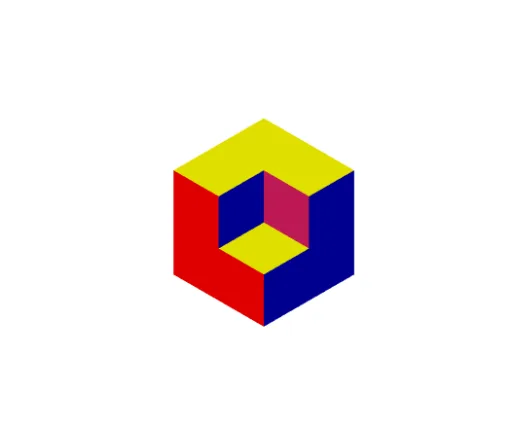
① This example constructs a 3D Necker cube with Vasarely-style illusion, demonstrating the ambiguous orientation of a wireframe cube when viewed in perspective. ② Core mathematical concepts include solid geometry (cube structure), perspective projection, and multi-stable perception in visual cognition; it also touches on rational numbers, power functions, derivatives, and fractal geometry as related tags, but the main focus is spatial relationships and visual reversal. ③ Construction details: The GeoGebra commands used are Cube to generate the cube and Polygon to define multiple faces (face1 to face11), along with edges (edge1 to edge11) and vertices (A to J). Rotation or sliders allow the viewer to switch between perceived orientations. ④ Suitable for middle school and above, this example is ideal for teaching solid geometry, spatial reasoning, visual illusions, and the intersection of mathematics and art.
GeoGebra Commands & Parameters
Cube((0, 0, 0), (0, 1, 0), (0, 1, 1)) → a, A, face5, faceBCDE, edge2, edge1, edge4, edge6, edge3, edgeAE, edgeBE, edgeBC, B, edge5, edgeCD, edge7, edgeDE, C, D, E, face1, face3, face2, face4Cube((0, 0, 0), (1, 0, 0), (1, 0, -1)) → b, F, face10, face11, edge8, edge9, edge10, edge11, edge12, edge13, edge14, edge15, G, edge16, edge17, edge18, edge19, H, I, J, face6, face7, face8, face9Polygon(B, K, L, (1, 0, -1)) → q1, b_1, k, l, fPolygon(B, K, M, E) → q2, b_2, k_1, m, ePolygon(A, E, M, (0, -1, 1)) → q3, a_1, e_1, m_1, gPolygon(A, (0, 1, 1), (-1, 1, 1), (-1, 0, 1)) → q4, a_2, h, i, jPolygon(A, (0, -1, 1), (-1, -1, 1), (-1, 0, 1)) → q5, a_3, n, p, qPolygon(G, (0, 1, 1), (-1, 1, 1), (-1, 1, 0)) → q6, g_1, r, s, tPolygon(J, G, (-1, 1, 0), (-1, 1, -1)) → q7, j_1, g_2, f_1, h_1
AI Drawing Prompt Reference
Create a 3D Necker cube with Vasarely-style illusion, showcasing the ambiguous orientation through perspective projection. The cube consists of multiple polygonal faces including bottom, top, and side surfaces with distinct edges. Use rotation or sliders to switch between perceived orientations, highlighting the visual reversal effect and focusing on the geometric structure, polygonal faces, and spatial relationships.
The prompt above was compiled from the original drawing commands and is for reference only.